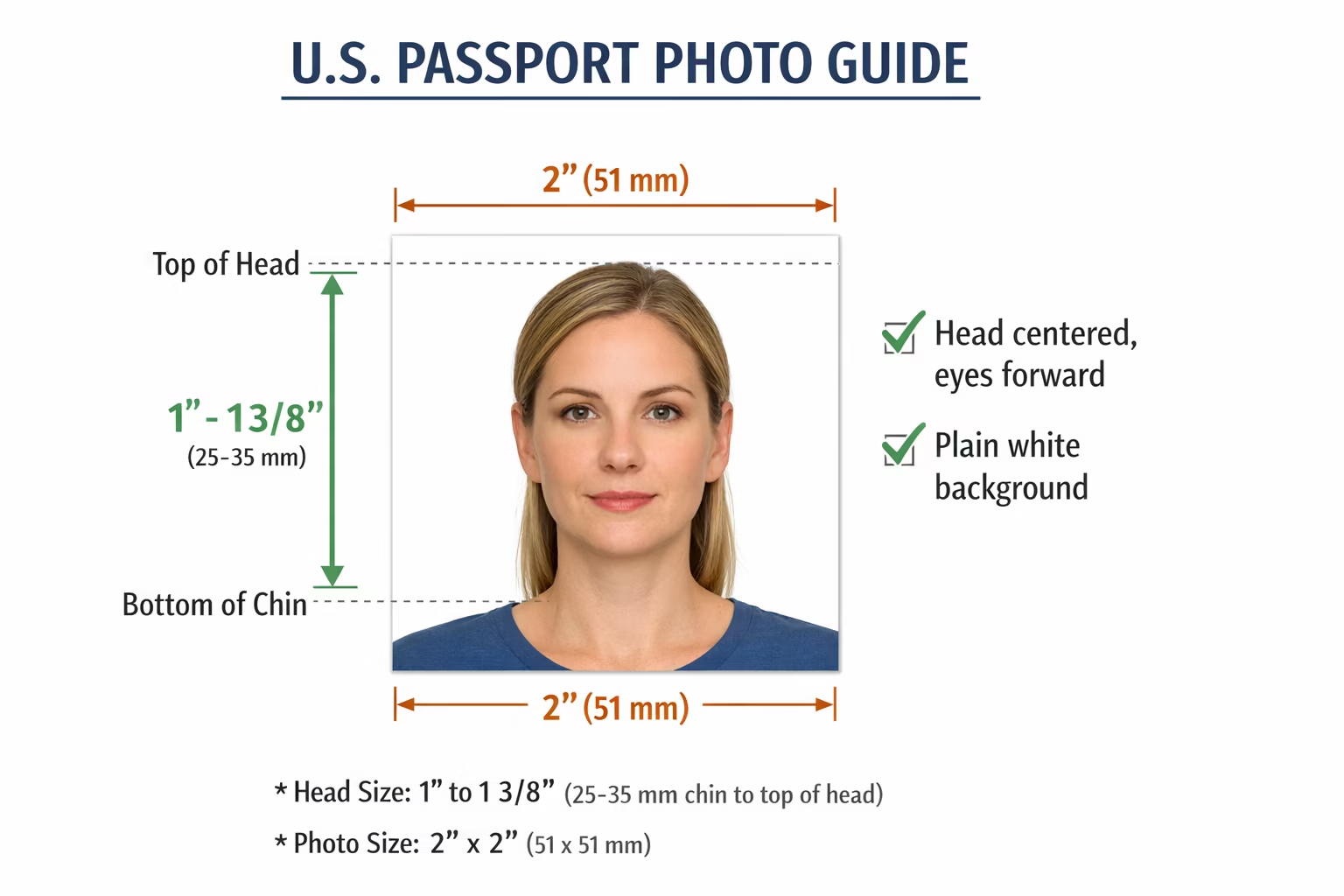
Here are the official U.S. passport photo requirements as of now:
1. Size and format
- Photo dimensions: 2 × 2 inches (51 × 51 mm)
- Head size: 1–1 3/8 inches (25–35 mm) from the bottom of the chin to the top of the head
- Color: Full-color, not black and white
- File format (for online submissions): JPEG if submitting digitally
2. Background
- Plain white or off-white background
- No patterns, textures, or shadows
3. Pose and expression
- Face forward and centered
- Neutral expression or natural smile
- Both eyes open
- No tilting or turning
4. Clothing and headwear
- Everyday clothing (no uniforms)
- No hats or head coverings except for religious purposes; face must remain visible from bottom of chin to top of forehead
- No glasses (since November 1, 2016, glasses are not allowed unless medically necessary)
- No headphones, wireless hands-free devices, or other accessories
5. Lighting and image quality
- Even lighting, no shadows on face or background
- No red-eye, glare, or pixelation
- Photo must be in focus and high resolution
6. Recent photo
- Taken within the last 6 months
- Reflects your current appearance
7. Other notes
- Children and infants: may be photographed with a plain background; no hands or toys visible in the photo
- Digital submissions (for renewals online) must meet size, resolution, and file format requirements
Here’s a step-by-step guide to take a compliant U.S. passport photo at home:
1. Gather your materials
- A digital camera, smartphone with a good camera, or DSLR
- Plain white or off-white wall or backdrop
- Adequate natural or bright artificial lighting
- Tripod or a stable surface for your camera/phone
2. Set up the background
- Make sure the background is uniform, light-colored, and free of shadows
- Avoid textured walls, curtains with patterns, or anything distracting
3. Position yourself
- Stand 3–5 feet from the wall to avoid shadows
- Keep your body straight and facing the camera
- Center your head and shoulders in the frame
- Keep a neutral expression (no exaggerated smile) and both eyes open
4. Lighting
- Use soft, even lighting from the front
- Avoid overhead lighting that casts shadows
- Make sure your face is fully visible, with no shadows on the face or background
5. Take the photo
- Camera at eye level, about 4–6 feet from the subject
- Keep head centered, eyes open, mouth closed
- Take several shots to choose the best one
6. Check the photo
- Head size should be 1–1 3/8 inches (25–35 mm) from chin to crown
- Photo size should be 2 × 2 inches (51 × 51 mm)
- Background plain and white
- Face fully visible, no glasses, hats, or other obstructions
7. Crop and resize
- Use free online tools like the U.S. Passport Photo Tool to adjust size, crop, and check compliance:
8. Print or submit digitally
- Print: Use glossy or matte photo paper, 2 × 2 inches, true color
- Digital submission: Save as JPEG, meet the State Department’s file size and resolution requirements (min 600 × 600 pixels, max 1200 × 1200 pixels, file <240 KB if online)
✅ Tip: Take a few test shots and check them against the State Department photo requirements before printing or submitting.