The WoodCentral forums are a place to ask questions, exchange knowledge, and discuss the many fields connected to wood—from hands-on shop practices to forests, lumber, and everything in between.
- Ask questions about tools, materials, construction methods, safety, equipment, and shop practices.
- Discuss wood-related fields, including carpentry, forestry, sawmilling, timber production, design, restoration, and other related areas.
- Share your projects and experience, whether you work with raw logs, rough-sawn lumber, construction timber, or fine finished pieces.
- Contribute insights that help others understand the science, craft, industry, and culture surrounding wood.
Unlike many forums, we allow posting without necessitating an account. However, creating an account not only safeguards your username but also enhances the experience, offering simplicity, speed, and security.
Features include a toolbar for post formatting, full-screen editing, and displaying source code using BBcode. Users can upload images from their devices or embed them from external sites. Each post allows reaction emoticons, and logged-in users can edit or delete their posts within five hours. Additionally, user profiles offer configuration options for various preferences. The boards boast a remarkable speed, with near-instantaneous page loads.
Register
If you never posted on the old message boards, you should register for an account. If you did post on the old message boards, see Passphrase reset below.
About passphrases
A passphrase refers to a lengthy password comprising a minimum of 16 characters, ideally consisting solely of letters and numbers, and must include at least one space.
- At least 16 characters
- Only letters and numbers
- Contains at least one space
- DO NOT use common phrases; bots will check for those
Examples
- detached connector
- flammable glove chariot
- matErnity frac4ture
After submitting, you will see the message
Thank you for registering. A letter with a link to activate your account was sent to the specified address. If it doesn't arrive you can contact the administrator at admin@woodcentral.com.Follow the link in the email to activate your account.
Didn’t receive an email?
- An account with the name or email address you provided already exists on the system.
- You made a typo in the email address, or the email went to your spam folder.
Passphrase reset
Our previous forum software lacked user accounts as they are implemented today, but it had a basic method to associate a name with a password and email address. This allowed posters to reserve a name, preventing others from using it, perhaps pretending to be them.
We utilized these associations of names, passwords, and email addresses to create user accounts on this platform. However, the passwords were encrypted differently, rendering them incompatible with this system’s passphrase method. This requires that they be reset by entering the email associated with the name. This proved to be problematic, as many email addresses linked to the names were not updated by users when they changed email addresses, so trying to reset the passphrase on this system does not work.
The system will only send passphrase resets to email addresses that exist in its database. It will not respond that you entered an invalid email address, as that presents a security risk. If you attempt to do a passphrase reset and do not receive an email, contact us with your current email address and the name associated with your account on the old forum software.
If you possessed a profile on the previous boards and the email address linked to it is still active, you can reset the passphrase by visiting the Login page and selecting the Forgotten link.
Enter the email address associated with your account. After submitting, you will see the message
If the email you specified is in the database, then an email will be sent to it with instructions on how to change the passphrase. If it does not arrive you can contact the administrator at admin@woodcentral.com.Follow the link in the email to reset your password.
Didn’t receive an email?
- The email address you entered isn’t in our system. Accounts transferred from the old boards are linked to the email addresses used at that time, which may be outdated. To receive an activation email, you must use the same email address associated with your old account. If you no longer have access to that email, please contact us to update your account with a current email address. Provide your full name, old forum username, any previous email addresses you recall, and your current email address to link to your account.
- You made a typo in your email address.
Profile settings
After logging in, select your username from the menu. Location will vary depending on screen size.
Select the Edit and Configure buttons to change profile settings.
Navigation
Latest Active Topics shows recent activity across the forum. Icons indicate unread content.
A dot before a topic means you have posted in it. A check mark shows that a reply has been selected as the solution by a moderator.
Each page includes a breadcrumb navigation at the top and bottom. It links to the forum index, the current board, and the topic you are viewing. The [ # ] link returns you to the board’s topic list, similar to using your browser’s Back button.
To reply to a specific user, click the @ symbol before their name. This opens the reply form with their name already filled in, which is useful in long discussions.
Clicking a user’s name opens their profile, where you can view details and send a private message.
Adding images
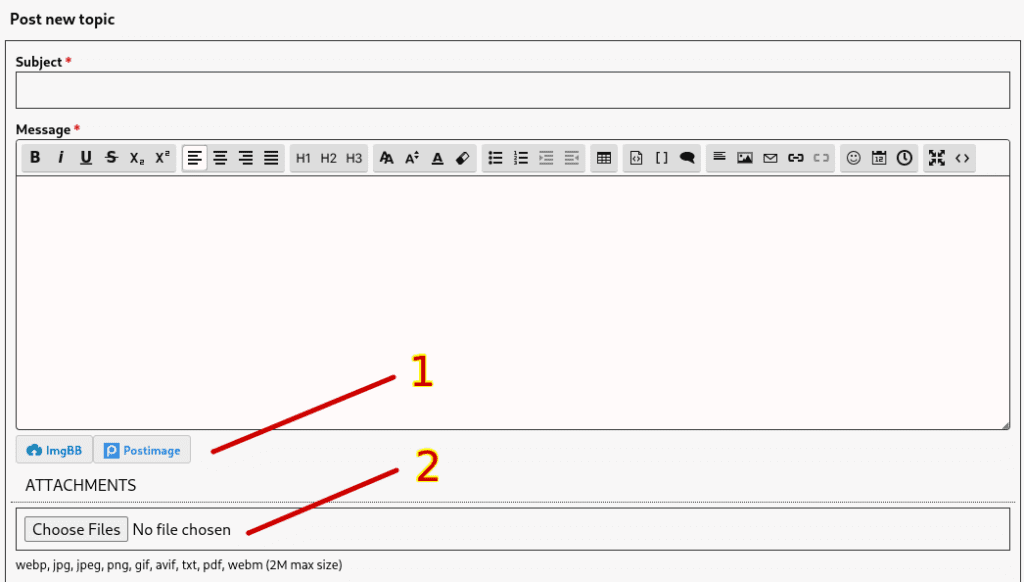
- Uploads image(s) to ImgBB or PostImage, 3rd-party image hosting services.
- Uploads image(s) to our server. Only available if logged in.
Images can be moved around just like text. Sometimes using the toggling View Source [<>] option in the toolbar makes this easier.
Choice is a matter of preference. One downside to using #1 is if the 3rd-party hosting service ever goes out of business, it will result in broken image links in the post. You may notice many images in old posts here where this is the case.
Latest active topics
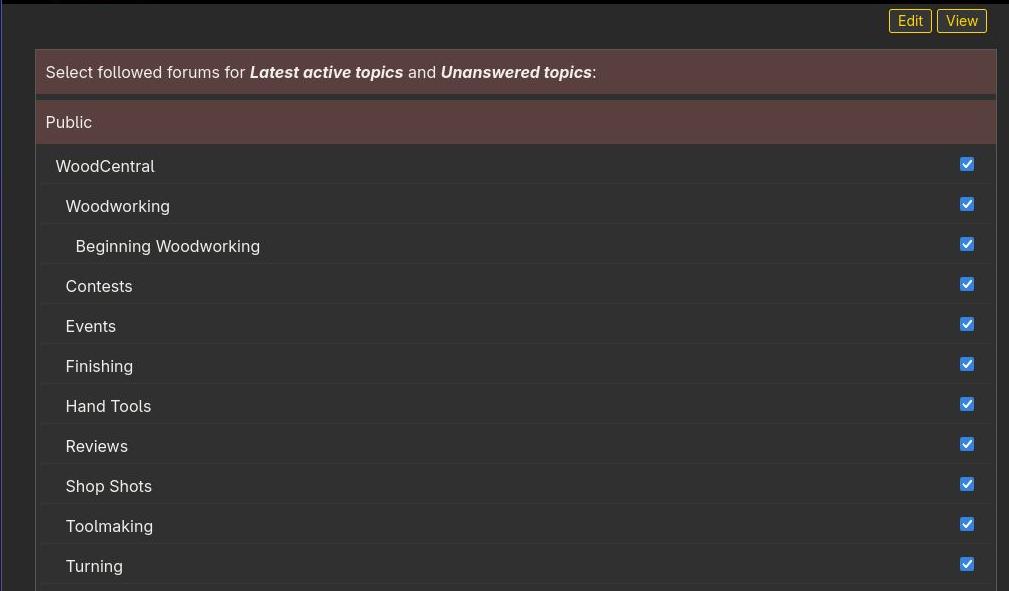
Registered users can select which forums to monitor for recent activity. Select Latest active topics > Set up and then select which forums to monitor.

Peter……somehow I’ve been lost in the shuffle……no longer recognized as a registered member……please help
I see you have posted since this comment. Did this get resolved?
Oops! Did we just lose a couple of months of posts at the general forum? I was locked out with a “forbidden 403” error at first and when I did get in the oldest articles were from June.
The 403 error(s) you got may have occurred during the most recent software update due to certain files not yet being transferred, but I’m not aware of any data loss. I am seeing all the most recent posts.
Paste the URL of a forum you think is missing posts, and I’ll investigate.
help how do you start a post?
https://www.woodcentral.com/forums/
Navigate to a forum and select the “Post new topic” button.
For example, the following will start a new topic in the Open Topic forum:
https://www.woodcentral.com/forums/forum/7/new/topic