
Then
Instructions for posting images on the web in the 1990s, from our Badger Pond archive.
https://www.woodcentral.com/articles/upload.php
Now
Just a couple of clicks for nice hi-res images...


Added later 13 min 22 s:
Posting Images
The forum has four ways of posting images:
ImgBB
PostImages
Attachments
Selecting the "Insert an image" icon in the editor toolbar
When using methods 1 and 2, the image you select is uploaded to a third-party image hosting service and will immediately appear in the editor. When using method 4 to post images as attachments (you can select more than one for upload), they do not appear until you select Preview. When using method 4, you paste the URL of an image which may be on WoodCentral or any other website that allows linking to images.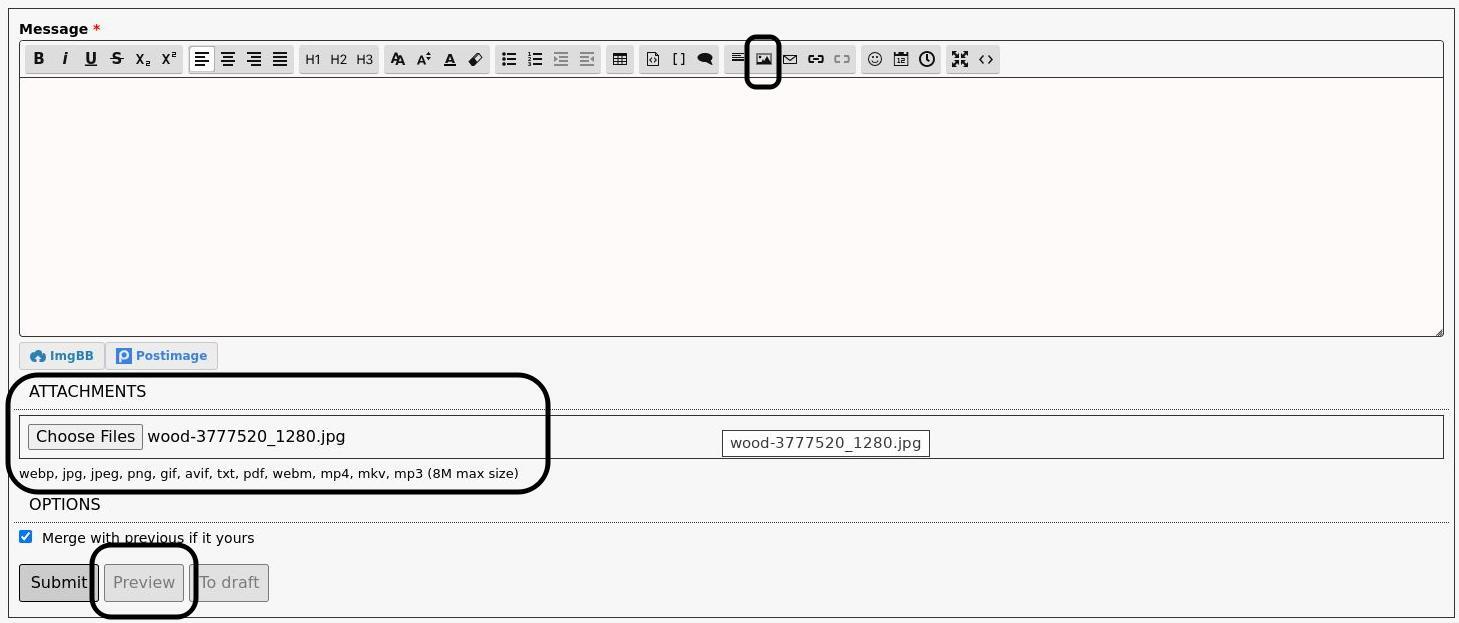
Added later 22 min 52 s:
Editing Modes

The toolbar's final two icons enable full-screen and code-view modes. For security, HTML is not permitted in posts. Code view uses a markup language (commonly called BBCode), which is similar to HTML but safer. This mode is useful for fine-tuning content and will feel familiar to those who know HTML.
Full-screen mode is particularly helpful when editing posts with images, providing a larger workspace to review and adjust content effectively.
Logged-in users can edit their posts after submission, which is convenient for correcting typos or making other updates. Some forums may impose a time limit on editing to avoid confusion if posts are altered after replies are made. Typically, these limits allow sufficient time for changes. Administrators and moderators can edit posts at any time and usually include a notice, such as [Edited 2025-05-09 05:59:49], unless the changes involve only formatting fixes.
Added later 11 min 08 s:
Table of Content

When creating headings using the H1 H2 H3 tags in the toolbar, the forum will create a Table of Content for the topic, appearing at the top of the topic:
Added later 03 min 57 s:
The forum even supports hashtags! Preface any word (without spaces) with a # sign, and it will create a link to any other posts with that hashtag. 
#MakeWoodCentralGreatAgain


