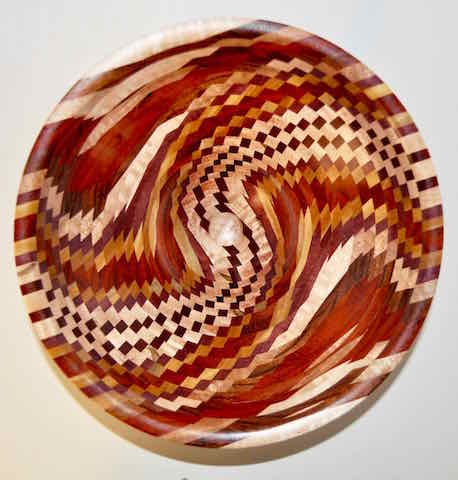
Been working on this one for quite a while. 16" African Mahogany, turned beads, wood burned radials and an original pattern. The center is always the trouble spot since the radial lines get close together, so putting "something" in there is one good answer, and the wife came up with this beaded Dragon Fly. There's a few beads scattered around the front surface for accents.
Think I'll go make some tops. This one has driven me cross eyed.
Jerry
Re: Sometimes it really works *updated with big pix*
Looking at your piece brought back so many fond memories of David Nittmann, and his basket illusion innovations. Your beautiful work would have made him proud...well done!
Re: Sometimes it really works *updated with big pix*
FYI: You can make the physical size of the photo much larger and still keep it within filesize requirements. Most any photo processing program will permit you to adjust the physical size and filesize separately.
If you don't know how to do this, please send me your original image, and I'll do it for you and send it back to you so you can repost it. We really want to see more detail in your magnificent work. It's wasted at this resolution.
...GG
Re: Sometimes it really works *updated with big pix*
As for the photo, if you email the original photo I can make it fit the forum and send it back to you (or post it for you). I'd like to see more detail too!
jkj
Re: Sometimes it really works *updated with big pix*
I run a mac with "Preview" as the adjustment program. It will only adjust size OR pixels. If I try to adjust one, the other changes and goes outside the program limits.
If you want to give it a shot, send me your email and I'll be glad to send you the originals.
Thanks,
Jerry
Re: Sometimes it really works *updated with big pix*
I work on a MAC and use photo shop. I set the size to 600pixels in the long dimension and then when I click save as it has a slider to reduce the file size so I simply slide it until it's below 95 and that has always worked for woodcentral.
Re: Sometimes it really works *updated with big pix*
John and John have also given you good recommendations.
I apologize -- I thought my email address was visible in my WC posts -- I know it used to be -- I don't know where it has gone.
Please send your original photo to me at gary.guenther@iname.com, and I'll size it and return it to you. I'm going to try to figure out how to get my email address back into my name line or profile. Ellis: help!?
I'm happy to do this for you, but for future reference, there are innumerable programs out there that will permit you to do it yourself -- either on your local machine or online. Just Google it, and you'll find them.
Cheers, GG
Re: Sometimes it really works *updated with big pix*
Photoshop here, too. Funny, I just wrote something for someone else. As you imply, adjusting the quality will let you post a bigger image with a smaller file size.
Do you ever use the Photoshop "Save for web" function? It has a lot of options but I just use the one where I set the maximum file size and it compresses to fit.
I case it is of interest, this is the gist of what I wrote for someone else:
There are two things that control the file size. One, as mentioned, is resizing to change the number of pixels in the image (the resolution). For example, you might resize a 2240x1680 photo to 640x480 pixels. When you save the picture the file size will be smaller.
The other, more important parameter for forum posting, is the image compression, sometimes called JPG compresson with common JPG files or Image Quality. By changing the compression/quality you can keep the picture larger while making the file smaller!
Some software programs will let you pick the amount of compression/Quality you want when you save the image. A higher compression = lower quality = smaller file size. Adjusting the compression makes it easy to make a files small enough to post without having to resize the picture to where it is too small to see the details easily. I always use Photoshop for image work (expensive) but there are many good programs and some are free.
As an example, I resized a photo to 1000x750 pixels, plenty large for a forum. I looked at the file sizes from different compression values that Photoshop offered in the image save dialog. Photoshop calls these numbers "Quality", from 0 to 12 where 12 is the best quality.
Quality 12: over 900K
Quality 10: 497K
Quality 8: 309K
Quality 5: 204K
Quality 2: 114K
Quality 1: 92K
I saved these the image at various quality levels.
A photo purist would choke at using such severe compression since the image quality suffers. But for forum use it really doesn't matter that much. It is hard to see the difference between the images. This is the smallest one with the worst quality:
Note that when compressing the file size depends on the picture itself, how "busy" it is, i.e. how much fine detail is in the photo. Without increasing the compression level (reducing the quality number), you might have to continue to resize some photos to a very small image size to get them to upload!
Our board moderator has worked some magic and enlarged the image of the platter; look at the top of the thread. Not sure how he does things like that, but that's why he's the moderator.
Thanks, Buddy.
Jerry
Re: Sometimes it really works *updated with big pix*