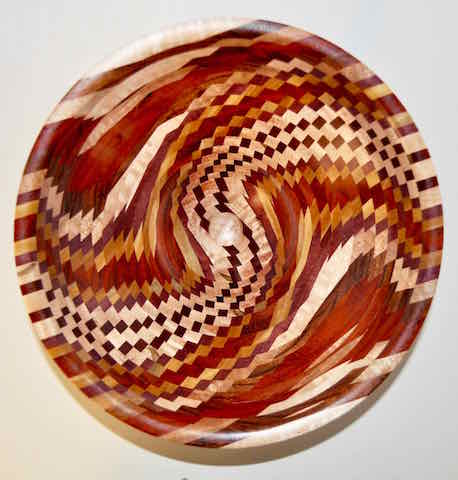
Bigger Basket Illusion
Jerry Maske
We'll see. On this one I colored the center silver differently using Liver Sulphate and managed to control it to get the colors I wanted. Now, will this site accept a larger picture? 
Knowledge You Can Build On — Est. 1998
Bigger Basket Illusion
Jerry Maske
We'll see. On this one I colored the center silver differently using Liver Sulphate and managed to control it to get the colors I wanted. Now, will this site accept a larger picture?
Re: Bigger Basket Illusion
David Walser
Jerry -- The piece looks phenomenal. Please keep posting pictures of your work. It's inspirational (and a little daunting) for the rest of us.
As for the picture itself, there are basically two aspects that you can adjust to get the right size file for posting. One is size of the picture itself, measured in in the number of pixels (or dots) on the x/y axis. The other is the "quality" of the picture file, which is a measure of how much information is packed into each pixel. That is, computer data file of the picture contains information about each dot (or pixel) that tells what color it is, how translucent it is, how bright it is, where it is located, etc. The data file can be set to record very slight differences in color between pictures -- with millions of options. This requires a large data file. Or, you can significantly reduce the size of the file by reducing the "quality" of the picture (and the number of colors it tracks). For the purposes of this website, thousands of colors will suffice.
What does this mean for posting a picture? In your photo software export the data file in JPEG format and reduce the quality to "low" or "internet". The resulting file should be small enough to post and large enough for us to see. HTH.
Re: Bigger Basket Illusion
Dennis in Southern Oregon
The file size of your picture is just under the 100 kbyte posting limit of the forum, but a viewer using MS Windows can easily scale the size of the image to see more detail. I do not know whether this works with Apple products, but with Windows you can left click on the image and drag it off onto the desk top as a .jpg file. If you double click that file it will be displayed by the Windows photo viewer. The photo viewer allows you to zoom the image to larger sizes to see more detail. Of course, as you zoom up you lose resolution. In the case of your photo, zooming the photo by a factor of three in width/height still yields reasonable clarity.
Re: Bigger Basket Illusion
Jerry Maske
David and Dennis,
I'm a Mac user; Hate PCs for all the reasons people have been known to hate them. The program on the Mac that allows for a "Resize" is "Preview." It's an awkward program but does the resize nicely.
Now, the question that was raised when I posted a Basket Illusion before was if it could be posted large enough for members to see it in detail. Using Preview, this is as big as I can get it. I can't find an area in Preview to decrease the density, so this is as big as I know how to get one.
The piece itself is 14" across and one of our own designs. Two things are important to know. First, the center. That's a silver gilded piece I made independent of the rest of the piece and added later. The silver is Oxidized with Liver Sulphate, in the sunshine, with a bottle of hot water and baking soda on hand. The colors change kind of quickly, so be ready with the baking soda in a Spritzer bottle to stop the process.
Second is the design coloring. There's a lot being said about what colors to use. Some bleed, some smear, some fade, and all that may be true. I've found that while Faber Castell are the best, the most expensive and, locally, the hardest to find, there are others. So, we did a test of all the color pens we could find, including Sharpie, applied a couple coats of finish and found that most of them worked just as well as the High Priced group.
My advice would be to test whatever kind of pens you have on whatever kind of wood you're planning on working with and see what happens. Bleeding isn't a problem IF you do a good job with your wood burning. That pretty well sets up barriers the colors won't cross.
Anyway, thanks for the comments. Hope there's some others that do this process that can teach me how to do it better.
Jerry
Re: Bigger Basket Illusion
John K Jordan
Jerry, I obviously missed some previous message, but in case it wasn't mentioned, one a way to get huge, detailed images to viewers is to upload them to some other web site and link to the large file here.
The FAQ here on posting photos is worth reading.
I won't get into the mac/pc discussion but will say Photoshop will easily do everything you need with images that you can't do or can only do painfully with many of the dumbed-down programs both platforms offer for the uneducated masses. Even the very inexpensive stripped down version, Photoshop Elements, does the job and does it well. (I don't know if Adobe offers a version for the Apple crowd.)
If anyone wants Photoshop image help/tips just ask. I have used it extensively for decades, professionally and otherwise.
JKJ
Re: Bigger Basket Illusion *LINK*
Jim Barbour
Beautiful work Jerry. Thanks for sharing it.
Perhaps the easiest way to provide large images for a site like this one is to store them somewhere else and post a link here. Here is an example of what I mean:

This is a 30MB image, uploaded via the "Upload embedded file" box in the reply window, which gets the idea across. The links are to the larger original on (in this case) Dropbox and Flickr. I did this by simply pasting the address for the image in the "Optional Link URL" section of the Reply page. In the interest of full disclosure you only get one link - I had to write the code for the others, but most of us only want to link to one larger image at a time so knowing how to write html is not necessary.
I have also included a link to a review of several free ways of storing images for exactly this purpose. I tend to use Dropbox and Flickr, but there are lots of choices out there. One of my sons is partial to Photobucket, the other uses Google+. There are lots of options out there. Here is a link to a review several of them, Tom's Review
Re: Bigger Basket Illusion
Jim Barbour
Quick addendum: If you do not have a Dropbox account it will appear that you cannot see the image. Look for the small "No thanks" at the bottom of the popup asking your to establish an Dropbox account.
Re: Bigger Basket Illusion
Ed in Leaside
"(I don't know if Adobe offers a version for the Apple crowd.) "
Photoshop first version was Mac-only. IIRC, I started with Version 3.?.
Photoshop Elements
John K Jordan
>>>"(I don't know if Adobe offers a version for the Apple crowd.) "
>>>Photoshop first version was Mac-only. IIRC, I started with Version 3.?.
Yes, I know they offer (the overpriced) Photoshop, but I was wondering about the nearly-free Photoshop Elements program. I just looked it up, and yes, it appears they do have a Mac version.
I wondered, since for at least a while Adobe dropped off a little on their Mac support and the PC side started getting more attention and quicker updates, probably due to the huge market. I worked at a government lab where the graphics department started out Mac only but that eventually changed till the balance was tilted the other way, probably helped by the lower cost of capable Windows machines. I stuck with Windows since the modeling/animation and video software I used was Windows only.
I also started with an early version of PS then bought upgrades for years. I quit at 6 or 7 which does everything I possibly need.
JKJ
Re: Bigger Basket Illusion
Chuck Jones - West TN
Not to disagree at all with your point, but there is one downside to linking to photos. If later you rearrange your photos within the site where you have them stored, it will result in a broken link here on this forum.
Re: Bigger Basket Illusion
Jim Barbour
I agree wholeheartedly. If you are going to do it this way it is best to create a permanent folder on whichever site and put copies of images there so they don't run the risk of exactly what you point out.
Nice catch, thanks.


