CAD for Furniture
R.J.Whelan
>Can anyone recommend a CAD program suitable for furniture design? Not to concerned about price; just want something fairly easy to learn. Thanks in advance ... rj
Est. 1998 — 27 years of woodworking knowledge
CAD for Furniture
R.J.Whelan
>Can anyone recommend a CAD program suitable for furniture design? Not to concerned about price; just want something fairly easy to learn. Thanks in advance ... rj
Re: CAD for Furniture
Moses Yoder in White Pigeon, MI
>Well this seems like a power tool, but I'll chime in. Auto Cad LT is really a great program, and if you get it, there is an on-line site that I'll point you to for a free tutorial that is really good, or I think you can buy a tutorial for it that is a pretty good program. The people I work for gave me the program and tutorial to learn on my home computer, and I have spent about 6 weeks with it and love it. Okay, people say it is difficult to use, but I don't think they really started at point A and went through a tutorial, and if you don't, it is hard to use. I don't do three dimensional views, and I don't usually color my drawings. But the ability to quickly put a sketch together to see how the proportions of a piece look is easy, and then to refine the drawing to really get a good idea of all the parts you need and how they will go together is pretty easy.
Look for a program that is easy to draw a straight line at any angle and specific distance in relation to other lines, and then also gives the ability to offset, mirror, copy, trim, extend, and easily draw circles and arcs based on either three points or a point and a radius in relation to other lines and you have a decent program. Auto CAD LT can do a lot of things, but if you learn a few basic commands you'll be sketching drawings very quickly and then soon learn how to add in a lot of details that will help you cut parts to the right size and envision how the piece will go together.
What are you going to be doing?
Ed Snow
>Are we talking furniture design or translation of a sketch into a 2d product for distrubition in the shop or cataloging for the furture.
Re: What are you going to be doing?
R.J.Whelan
>Ed ... I often work with customers who aren't really sure about size and proportion - very often they will describe a piece that I know will be clumsy looking. I find myself building a lot of mock-ups out of scrap to demonstrate the point and I'd like to eliminate some of this; I don't mind mock-ups but I would rather build them as an instructive device for myself rather than a teaching tool for customers.
Currently I make pencil sketches from which to derive a cutting list; my sketches are pretty rough and not really suitable for showing to a customer (they don't inspire confidence), so a CAD drawing will be as much a marketing device as it is a design aid ... rj
Sounds like you need a model, not a drawing.
Ed Snow
>To do this we are talking some serious software and a very large learning curve, but it is approachable, although the software cost multi thousand per license in some cases makes it less so. Software that would be appropriate, autocad, solidworks, 3dsmax, maya, rhino, or two of them combined.
The results would be a full blown model which could be inserted into an existing photo of its final location and a fully explorable object.
What you can do with Solidworks
Sandor in Boyds, MD
>Just an example of a Solidworks model...
It even allows you to do photorealistic rendering, but the software will set you back $5k per license...
I get to use it here at work...
Sandor (Yeah, one day I plan to make that bench...)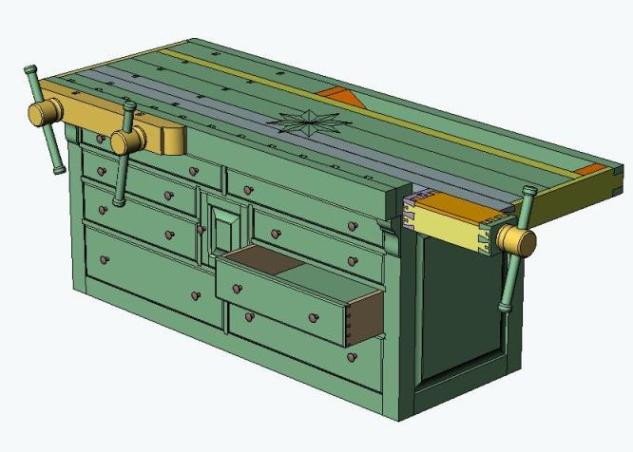
Sandor...
Scott Burr in Ben Lomond CA
>Everybody knows pro-e is better program;)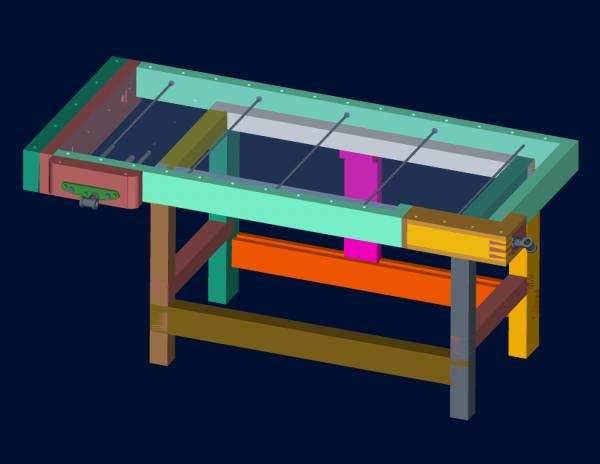
Re: Sandor...
Sandor in Boyds, MD
>Yes, it does occur to me that someone who appreciates ANTIQUE tools and working without POWER, might think Pro/E is better....
Re: What you can do with Solidworks
Jack from Maine
>Sandor,
What's the door between the middle drawers for? I like that cabinet design.I may use it for my bench.---Crackerjack
But if you are serious you use autocad and 3dsmax.
Ed Snow
>At least as a designer, if you are an engineer you can keep your crazy software.
Crazy designer bias, it exists at iowa state and very obvious too. pc/mac/solaris, rhino, 3dsmax, pro/e solidworks. It just depends on which program you are in to which your end bias will be.
As you can see all of it works well.
Rhino is very nice for surfs
Scott Burr in Ben Lomond CA
>
Re: price?
paul womack
>IIRC for the price of those 2 you could buy all your lumber, and an infill to work it with.
BugBear
Visual interest...
Sandor in Boyds, MD
>No particular reason, I just wanted to break up the symmetry left to right to add a nice design element. Inspiration was a Borkholder Amish Mule Chest (of drawers).
Sandor (Who seems to like to make things more complicated than they need to be)
Re: Visual interest...
Jack from Maine
>I thought you may have designed that for a paticular application. I like the way it looks amidst the drawers. If I can find a practical purpose for it I may still use it.----Crackerjack