WoodCentral Forums

Est. 1998 — 27 years of woodworking knowledge

Alternative to shooting board: Edge jointing jig

Posts

Alternative to shooting board: Edge jointing jig

#1

Alternative to shooting board: Edge jointing jig

Derek Cohen (in Perth, Australia)

>I have noted in recent post that several contributors have stated their reluctance to attempt the jointing of board edges as they perceive it to be too difficult.

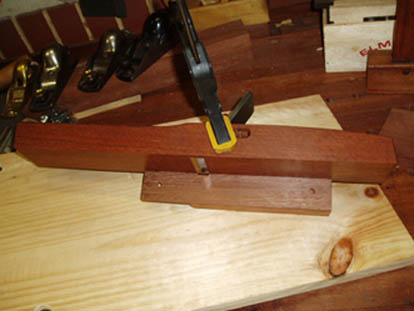
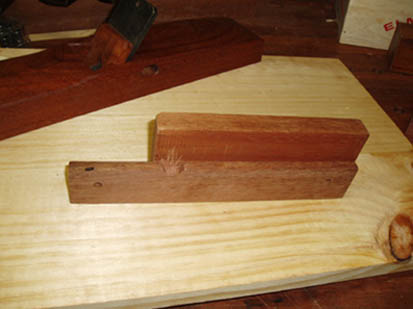
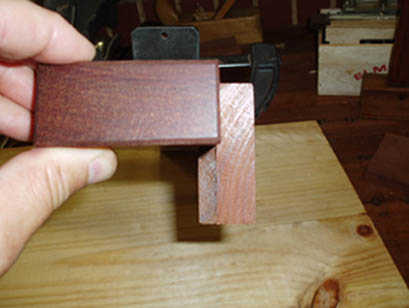
It is not always easy to get exactly square edges with a handplane. Takes a lot of practice, and even then it is tricky. So I stole an idea (Stanley's I believe) and built a fence that I could clamp onto a plane. Nothing fancy, just a couple of pieces of off-cut. It should take you all of 5 minutes to built this. And it works extremely well.

Just ride the fence against the vertical side of the timber, take shallow cuts, and (of course) cut with the grain.

This is an alternative to a shooting board for long edges (long grain). It is not intended for the cross grain, which is where a shooting board rules. And at least you don't wear out the sides of your planes.

There are 3 pics in all. Here is the first.

Regards from Perth

Derek

p.s. I am struggling to edit the pics to make them both large and detailed. The 40k limit makes it difficult. Drop me a note with your successful strategies. I use Adobe Photoshop Elements.
img

Re: Alternative to shooting board: Edge jointing jig

#2

Re: Alternative to shooting board: Edge jointing j

Derek Cohen (in Perth, Australia)

>Pic 2. Note that there is a notch cut into the board for the extreme edge of the blade.


img

Re: Alternative to shooting board: Edge jointing jig

#4

Ellis Walentine

40Kb limit

Ellis Walentine

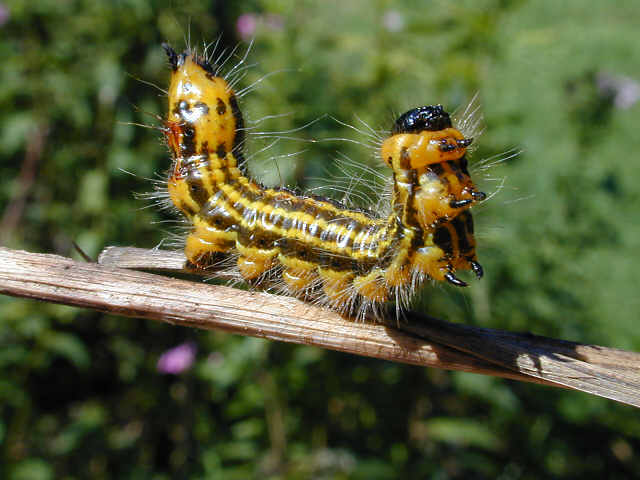
>Here's a shot that I think is large, detailed, and under 40 Kb. The secret is to make the actual image dimensions and resolution such that the image will be under 40Kb when you apply mo more than about 30% JPEG compression. I've found that higher compressions result in too steep a drop-off in image quality. Since you can get this kind of quality in a 640 x 480 image and still be under 40 Kb, I see no reason to increase the size limit.

One other thing that will keep your file sizes lower is to crop the images tighter, so you don't waste pixels on uninteresting background details.

(Somewhere, I have posted a long-winded version of this -- maybe on the messages board, several months ago.)

The only other variable is the amount of complexity in the image itself. If there is a lot of small detail, the compression algorithm will have to make a larger file to handle the added detail.

Ellis


img

Re: Alternative to shooting board: Edge jointing jig

#5

Lonnie's been trumped

Bill Houghton, Sebastopol, CA

>First we had bench dogs, then bench cats, then shop rats -- now we have a shop caterpillar?

Nice pic, Ellis. What did you have to do to get him/her to stand up like that? Offer nectar? Make scurrilous comments about butterflies?

Re: Alternative to shooting board: Edge jointing jig

#6

JPEG Compression

Steve Elliott

>I've tried to get image quality as good as the caterpillar picture in a small file, but haven't been able to do it using Photoshop. Just now I tried to compress the caterpillar photo down to less than 40K and found that a JPEG quality level of 1 (out of a possible 12) was necessary. The image quality was significantly degraded.

Can I ask what program you used to get that good an image in such a small file?

Re: Alternative to shooting board: Edge jointing jig

#7

Re: JPEG Compression

Dan Donaldson

>I guess I am misunderstanding something. Do you have another copy of the catapiller picture because the one posted is already below 40K (it is about 38K)

Re: Alternative to shooting board: Edge jointing jig

#8

Re: JPEG Compression

Steve Elliott

>I opened the image in Photoshop and then tried to save it under a different name. In order to get the file size below 40K, I had to use a very low level of image quality.

Obviously, other programs are able to make 40K images that look better than the one I ended up with. I'd like to find out which programs can do that.

Re: Alternative to shooting board: Edge jointing jig

#9

Re: 40Kb limit

Jack from Maine

>Ellis,what is the actual photo size of that shot? In inches before compression. I've been trying to figure this image editing out but it's still confusing.---Jack

Re: Alternative to shooting board: Edge jointing jig

#10

What happens?

Clay Craig in Miami

>Steve,

What happens if you right-click Ellis' photo, hit 'save as' and then check the properties of the saved file? I too show it as posted, at a 38.6K file.

I'm guessing that in Photoshop you are automatically opening it as a 1600x1200 image or some such, and then degrading from there rather than just reducing the size - ?

Clay

Re: Alternative to shooting board: Edge jointing jig

#11

Re: What happens?

Steve Elliott

>The image stays the same size (640 x 480 pixels), but the file size is over 40K when saved at every high or medium quality level. The 37K version I ended up with (at quality level 1) doesn't have as much detail as the original. Maybe it's just the problem of saving an image twice using a lossy file format, but in the past I've seen other images with small file sizes that looked better than the ones I could get using Photoshop. If there's a program that does a better job of this, I'd like to know which one.

Re: Alternative to shooting board: Edge jointing jig

#12

not wearing out your plane's sides..

Mike Schwing from Md.

>I too cringe at the thought of messing up my nice wooden plane bodies by using them on their sides. I've found that "slick strips" can be used to protect the plane body. They adhere well, are pretty easy to remove, and have the added benefit of making the plane ride more easily on its side. Pluses all of the way around.

Woodcraft carries slick strips in different widths, for one source. I'm sure there are others.

Re: Alternative to shooting board: Edge jointing jig

#13

Re: What happens?

Dan Donaldson

>If you right click and "save as", it should not go through any program at all. If you do it this way, then check the file size without opening it at all, is it the 38.6K? If so, then there is something weird that your program is doing to the file.

Re: Alternative to shooting board: Edge jointing jig

#14

program *LINK*

Clay Craig in Miami

>Photoshop is the gold standard for picture editing, so my first recommendation is to figure out what it's doing. As Dan says here, when you save that pic, then right-click on the saved file and click on 'properties,' no program at all should open, and you will have a 38.6K file. I don't use Photo$hop, so I can't help you with its workings.

But, if you want to have a different good, simple, small, free program for basic picture resizing, editing, cropping etc, I recommend Irfanview (link below).

Let us know ...


Irfanview

Re: Alternative to shooting board: Edge jointing jig

#15

Re: What happens?

Pam Niedermayer - Austin, TX

>When I simply save it, it is 40k (39.59 precisely); but when I look at it in Photoshop 5.5, it's 900k. This is because Photoshop has some housekeeping stuff to do, work areas and the like. From Photoshop (the full version, don't know anything about Elements), you use Imageready to prepare it for the net. IR can be invoked by the "Save for Web" choice in the "File" menu. There you'll have a full set of options for downsizing the graphic.

Pam

Re: Alternative to shooting board: Edge jointing jig

#16

Creating New Images

Steve Elliott

>I'd like the ability to create new image files that are both high quality and under 40K. My results with Photoshop don't seem as good as some of the images posted by others (like the one Ellis posted of a caterpillar). That's why I'm asking about which program might work better.

Re: Alternative to shooting board: Edge jointing jig

#17

Use "save for web" feature

Jim Stafford in GA

>When I took Ellis' photo at 39.9 kb into Photoshop and then saved it as "Save for Web" mode, moved the "quality" to 47 and could see the size go to 39.9 kb as I moved the pointer on quality. Looking at the two pictures side by side, they look the same. As I click from one to the other, there is a slight "stretch" in the middle of a few pixels which could not be seen with pictures side by side. They both look great.

Jim in GA

👍 This page answered my questions

Your vote helps other woodworkers quickly find the answers and techniques that actually work in the shop.