>I hate this. Makes me feel old and incompetent. I have pretty much given up on posting pictures because I find it so hard. Pardon the rant, but what is with the soft ware? How can you crop out most of a picture and it remains the same size or larger. Save it to 25%. 25% of what? Not any math I'm aware of. I tried downloading the image resizer from Microsoft and it appears to do nothing. Where does the picture go? Same thing with picture resizer recommended on the turning side.
I have downloaded two pieces of clutter into my computer and they appear to do nothing.
What I can't quite grasp is if the WC board demands 40K why don't the resizers have a setting for 40K. This is like trying to buy potatoes by the yard or gasoline by the square foot. Give me an hour's worth of that walnut veneer.
My son sent me an e-mail picture of the bed and night stand I made for him and I would like to post it but I can't figure how to cut it down from 4.2MB to 40K. Asked him to send another at a lower resolution and he did, but now the computer won't open them because "there is no application associated with them". Go to somewhere and assign something. Give me a break!, these are JPEG files, just open them, You're the computer, use anything you want.
I could go and sign up for some site that lets me post them there but I�m having so little luck here I don�t even want to try a whole new site.
>If it is the microsoft one that lets you right-click on a jpg picture and select resize then:
The resized copy goes into the same folder the picture was in with the resize option you selected. So if the file was abcd.jpg and you picked medium the resized file will be abcd(medium).jpg. If you look right away in Windows explorer it will likely be at the bottom but if you close explorer or go to a different folder than come back to that folder it will probably then be in alphabetical order depending on how you have your folder view set. You can see the size in explorer.
Resizing is one of those things that is not obvious because of how your screen and pixel numbers interact.
>I posted a reposne little while ago about I trick my wife does on her computer. Find your large picture that came from yoru camera in your "My Pictures" folder, right click it an say > Send To > Mail Receiptient. Then it will ask you if you want to automatically resize it. Email it to your self and you should get a much smaller version of the picture.
The 40K limit is just an arbitrary limit defined in the Wood Central software, resumably set by default or the administrator, and based on what they know is a workable size for this particular software and server combination. It is not standard by anymeans, so that's why there is no "Resize for WoodCentral" button in the photo software you are using. The closest thign to auotmatmically resizing photos smaller for internet relaetd use, is the Email feature I mentioned.
I think you are leaving out the compression step needed to get the resized/resampled file down to say 40K. Two steps are needed to do what you want to do: 1) Picture resizing, and 2) Compression of the resized file. When trying to make a picture smaller (usually the case for web pics), you resize first by a process known as resampling. Resampling throws away data to make the picture smaller. When going to a smaller pic size, this tossing out of pixels is generally not a problem (within reason). Now that you have a smaller picture size (in pixels), its optimum file size may still be too large for your use given WoodCentrals criteria of 40K. So you must do a second step - compression.
Now here is where the problem is. Most software programs make it very difficult to know what the compressed file size is in real time. You end up going through a iterative process where you change pic size or perhaps a quality setting, store the file, check its size, and start all over. Very cumbersome at best.
Both Paint Shop Pro X and Paintshop CS2 will allow you to optimize the file size in real time. But both those cost money, especially CS2. Paintshop Elements 5 may allow you but I don't have it so can't comment. Here is one freebie that I like a lot that will do what you want (in addition to many other things). It is FastStone's Image Viewer. In a nutshell, you first display your pic in the browser, crop if necessary, resize it, then go to the save-as menu and look under advanced options. There you can change the quality of your pic and see the final compressed file size in real time. Then save that newly compressed file, UNDER A DIFFERENT NAME, and then post it at WoodCentral. There are likely other programs out there that will do this, but this is one I am familiar with.
Oh yes, don't try to just compress your large 4 meg file to 40K without resizing first - it will look awful.
Hope this helps, and I apologize for the long-winded discussion.
>Barry, there are a couple dimensions to a JPG (or other format) image that you should be aware of:
1. Number of pixels in the image. Depending on whether you are using a 4 megapixel camera or a 10 megapixel camera (or other megapixel count), and what resolution you are using with that camera (e.g., super-high quality, high-quality, standard, basic, etc. -- however your camera offers the choice) the image could be anywhere from, say 640 x 480 to 5120 x 3840 or more. Every pixel requires a certain number of bytes of memory to remember the exact color of that pixel, so the more pixels, the more memory. A 4.2 Mb image is pretty big for a JPG, so you must be using a fairly high megapixel camera, possibly on the highest resolution setting. You can reduce the filesize by selecting another resolution, but I don't advise that. Memory is cheap. I prefer to shoot at a high-quality resolution and then keep the hi-res originals in a folder of their own and never touch them. When I change them (crop, lighten/darken, resize, etc.), I save the altered shots in another folder with a different name. This ensures I will always have the originals to go back to if I want to change them in some other way in the future.
2. Compression. JPG images are "compressed" images, where adjacent pixels are all saved as the same color instead of having separate information for each individual pixel. At the microscopic level (if you zoom in to 5000% or so), you can actually see the averaged pixels as blocks of color instead of different colors. This is the key to "resizing" an image. You don't have to change the physical size (e.g., By using an image manipulation program such as Photoshop or Paint Shop Pro or one of the simpler ones (I don't know which ones you tried), you can choose different compression ratios for an image. The more compression you apply, the smaller the file size becomes, but image quality drops, too, so you need to find a balance between image quality and file size. The 40Kb filesize on WoodCentral (I have incresed it to 60Kb on this board and 80Kb on the Turning board, by the way) is an arbitrary size that I have chosen that allows excellent quality and image size without taking up too much of our server memory. File size affects the download time, so this limit is a courtesy to our dialup visitors as well.
The drill that I have recommended several times in the past is to follow this series of steps to resize photos for uploading. Other visitors have their own methods, but they all arrive at the same conclusion. I'm going to skip talk about adjusting brightness, contrast, saturation, etc., and stick to resizing for messageboard uploads.
1. Crop the image. Using you image program, crop the big camera image to include just the information you want to convey. This gets rid of unnecessary picture areas and immediately cuts down the number of pixels.
2. Physically resize the image. That means to use the resizing function of your image program to reduce the pixel dimensions to something that will look good on the forum. I have found, as have other folks, that if you resize your image so that it is, say, between 500 and 600 pixels on its long dimension, it will fit within WoodCentral's messageboard window yet contain plenty of detail and visibility.
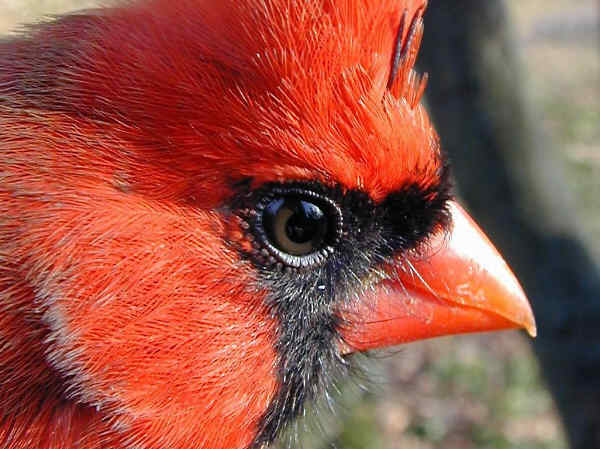
3. Save the image with appropriate compression. When you go to save your resized image, you will have an option of choosing a JPG compression ratio. In some image programs, this will be something simplistic like fine, medium, coarse or some such descriptors; in others, you will be able to specify the exact compression, and possibly be able to preview the chosen compression ratio to see if the quality is still there. The 60Kb limit on this forum is actually quite generous, and here's a picture to illustrate it. This photo is 600 x 449 pixels and takes up only 38Kb of file size, less than 2/3 of the 60Kb limit on this forum.
Once you have resized and compressed and saved your image, all you have to do is upload it by browsing to its location on your computer and selecting it from the Browse... function of our messageboard software.
I hope this sheds some light on things for you. As you can tell from the number of people posting pictures, it really isn't as difficult or daunting as it seems at the outset.
>Oh man! I had it well under 60K weeks ago. I thought the limit was 40. Some time ago I tried posting one that was 40.1k. Those computers are quite literal. Thanks. Thanks for the increase in size and thanks for the explanation. I feel like a guy sorting brown socks from black socks blind-folded in the dark with gloves on.
Ellis, have you seen the discussion of �Lurkers� over on the Turning side? Who would have thunk it? Some of those folks are really upset. I need to post a picture fast. I fear the Lurking Police will show up a revoke my membership.
The whole picture thing is amazing to me. One that we can do it at all is amazing. But then it�s another whole craft to learn along with the sub-craft of how to post the picture. I�d rather be sanding.
>Hi Ellis -- I too want to be able to post pictures, but I am also one of those dummies that doesn't know a JPEG from a pixel and even if I did, I wouldn't know what to do with it if I had one. Like I said once berfore on this subject here on WOODCENTRAL, even brain surgery or flying a 747 is easy (I can attest to the latter one first hand) -- IF you know all the terminology and how to do it. Explanations like the ones in this thread do nothing for me and I'm sure many others when it comes to posting pictures.
Could it could be possible to provide some step by step tutorial as part of the WC website? (and I truly mean a keybord click by keybord click tutorial) This should be one that is not made up of cryptic computer abbreviations, terminology descriptions, or references to some photoshop or off web storage site. If such programs or websites are required, they should be automatically link provided for the user as well as a tutorial available on how to use them.
I feel like I have something to contribute to this wonderful resource of WOODCENTRAL, but my lack of computer terminology and understanding is limiting my ability to do so. Thanks for hearing my computer illiriate rant.
WC is the best, and could be even better for us dummies.
>Mark, I just went a tried this. The picture is on my desktop and I highlighted it without opening it and right clicked, went to Send to "mail recipient" and it automatically opened a piece of mail and attached it, but it was still at 3.5MB. Did not ask if I wanted to resize it. I thought the pic was at 4.3mb, and I don�t know how it picked 3.5MB. I use Outlook Express and am on Comcast Cable. I did finally get Pixresizer to work. This is a strange world. Also, my son emailed it to me to start with.
>I know I am the last person that should be advising you, but I just managed to whip this problem with help from Ellis and the others here. Over on the Turning forum Harvey Brooks posted a link to Pixresizer. I downloaded it which was very easy. It comes up and you click on �load picture� at t he top left. In the middle of the page there is a box that allows you to enter a number. Actually a pair of numbers. I put 400 in the first position and it added the rest. I left the block below about maintaining the ratio checked. I click on �maintain the original format JPG.� And then clicked the bar below. At that point it asked where to put the picture and I chose Desktop. My picture came up 36K and I went to Wood Central, �post and new message� wrote my babble, clicked on Browse, and went to Desktop and attached the picture which was labeled as being 400 X something. PixResizer loaded itself onto my Desktop also.
Pixresiszer is literally 1. Load, 2. size, 3 retain format, 4, save pic.
Play with it and as long as they come out less than the 60 K or 80K on the turning forum, they will post.
>Hmmmm... I know it has the additional "feature" where you can say "please don't ask me this question again, next time just do it this way". THen again it might be the version of Outlook Express. I know my wife had this feature when she used Outlook Express and now that she uses Outlook.
>...every image manipulation program works a little differently. It sounds like Pixresizer is a good simple one. Why don't you download it, do as Barry suggests, and see if it solves your problem. I tried to keep my explanation simple, but I can't be more specific without getting into the workings of every image processing program out there.
If Pixresizer and Barry's explanation don't work for you, let us know and someone will walk you through it.
If you haven't already done so, you should send that pic to Birds 'n Blooms with the story of how you came to get such a fine close up of a cardinal.
That has got to be the best photo of a bird taken by a non-birding professional photographer (You don't do that professionally, do you?) that I have ever seen.
>I wish I could credit my fancy equipment or technique, but I shot it hand-held with my old 2.3 mp Nikon CoolPix950. The cardinal had flown into my office window and stunned himself, so I grabbed the camera, ran outside, held the bird in one hand and the camera in the other, and fired off a few shots. He recovered shortly thereafter and flew off, none the worse for wear.
>Ellis amd Barry -- Thanks for the response. I will try to go through thie program that Barry recommended. I can't guarantee that I will be succesful, but I will try. Ellis you said that there were too many different ways to do this. Why can't you just pick one of them to put in a tutorial? I could live with that. Thanks again -- Wayne (who is still trying to figure what a JPEG is and what to do with it when I find one)
P.S. The only way that I figured out how to make responses to messages on the WC message board is because there was a response box at the end of the message that said "POST RESPONSE". I can do that!!