Use a Content Delivery Network (CDN). Cloudflare is the most popular and offers a free plan.
Security > Security Rules > Create Rule > Custom Rule > Edit Expression
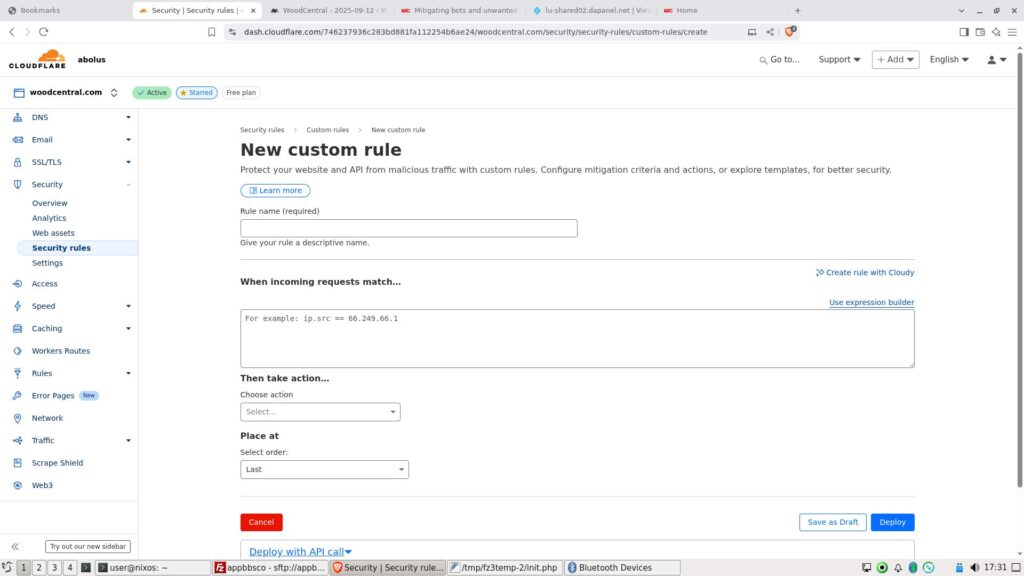
Add the following expression modified for your needs. The first part defines who NOT to allow. The second “and not” part is who to allow. In this case, it is blocking an IP range and user agents containing terms often found in unwanted bots.
(
  ip.src in {34.174.0.0/16}
  or
  (
    http.request.uri.path ne "/healthcheck"
    and (
      lower(http.user_agent) contains "bot"
      or lower(http.user_agent) contains "crawler"
      or lower(http.user_agent) contains "spider"
      or lower(http.user_agent) contains "slurp"
      or lower(http.user_agent) contains "curl"
      or lower(http.user_agent) contains "wget"
      or lower(http.user_agent) contains "python"
      or lower(http.user_agent) contains "java"
      or lower(http.user_agent) contains "php"
      or lower(http.user_agent) contains "perl"
      or lower(http.user_agent) contains "scrapy"
      or lower(http.user_agent) contains "libwww"
      or http.request.uri.path contains "/wire/"
    )
  )
)
and not (
  lower(http.user_agent) contains "w3c_validator"
  or lower(http.user_agent) contains "googlebot"
  or lower(http.user_agent) contains "bingbot"
  or lower(http.user_agent) contains "oai-searchbot"
  or lower(http.user_agent) contains "freshrss"
  or lower(http.user_agent) contains "duckduckbot"
  or lower(http.user_agent) contains "baiduspider"
  or lower(http.user_agent) contains "yandexbot"
)
The “Then take action” selection can be Managed Challenge or Block. The Managed Challenge will allow a blocked human to prove they are human.
The “Place at” selection should be set to First.


