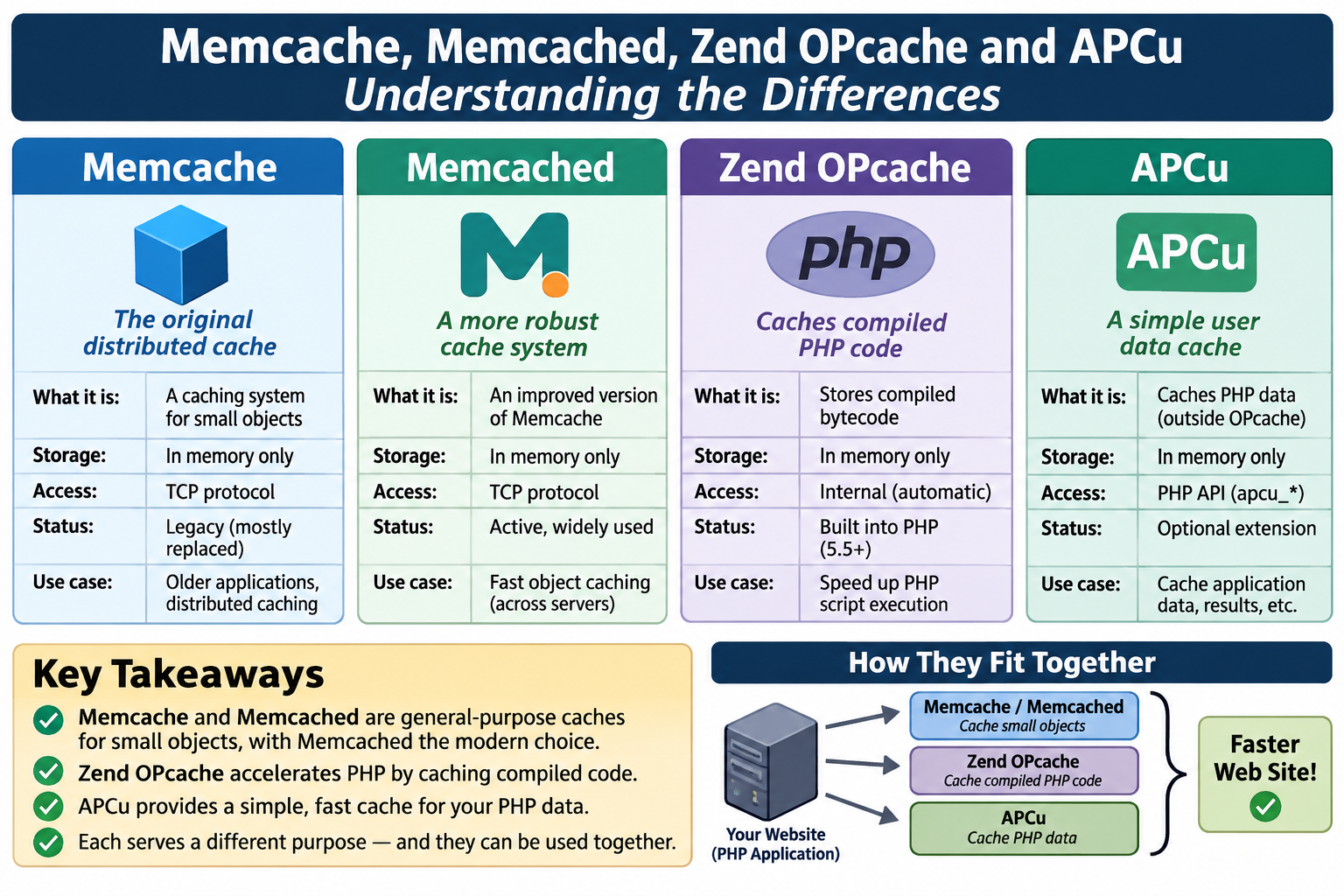
Caching is one of the simplest and most effective ways to improve website performance. Rather than repeatedly retrieving data, executing PHP scripts, or performing expensive database queries, a caching system stores the results of previous work so they can be reused.
However, the terminology can be confusing. Memcache, Memcached, and Zend OPcache are often mentioned together, but they serve different purposes. Although all three improve performance, they operate at different levels of the application stack.
Understanding those differences helps you decide which caching mechanisms are appropriate for your website.
1. Memcache: the PHP extension
Memcache is a PHP extension that provides an interface for communicating with a Memcached caching server.
It allows PHP applications to store and retrieve data using a relatively simple API. For example, a PHP script can store the results of an expensive database query and retrieve them on subsequent requests without querying the database again.
Typical uses include:
- Caching database query results.
- Storing frequently accessed application data.
- Caching rendered HTML fragments.
- Maintaining temporary application state.
- Reducing repeated filesystem operations.
Memcache is not the actual caching server. It is the PHP-side interface that communicates with one.
2. Memcached: the caching server
Memcached is an independent, high-performance, distributed memory caching system.
It runs as a separate background service (daemon), typically listening on a network socket or Unix socket. Applications communicate with it through a client library or extension.
Memcached stores data in RAM as key-value pairs. When an application requests a value, Memcached looks up the corresponding key and returns the stored data if it exists.
For example:
- PHP requests a database record.
- The application checks Memcached for that record.
- If the record exists (a cache hit), it is returned immediately.
- If it does not exist (a cache miss), PHP queries the database.
- The result is stored in Memcached for subsequent requests.
Memcached is particularly useful when multiple PHP processes or applications need access to the same cached data.
Its characteristics include:
- Data is stored in RAM rather than on disk.
- Access is extremely fast.
- Multiple applications and servers can share a cache.
- Entries can have expiration times (TTL).
- Data is generally volatile and disappears when the service restarts or entries are evicted.
- It does not provide persistent storage or database-like transaction guarantees.
Memcached is deliberately simple. It is a cache, not a database.
3. Zend OPcache: compiled PHP bytecode caching
Zend OPcache serves an entirely different purpose.
PHP is an interpreted language, but that description hides an important detail: PHP source code is first compiled into an intermediate representation called opcodes before execution.
Without OPcache, PHP generally has to repeat the compilation process whenever a script is executed:
- Read the PHP source file.
- Parse and compile the source.
- Generate opcodes.
- Execute the opcodes.
Zend OPcache eliminates much of that repeated work by storing compiled PHP opcodes in shared memory.
On subsequent requests, PHP can retrieve the already-compiled opcodes instead of parsing and compiling the source file again.
This reduces CPU overhead and improves response times, particularly on sites with many PHP scripts or frequent requests.
OPcache characteristics include:
- Stores compiled PHP opcodes in shared memory.
- Avoids repeatedly compiling PHP source files.
- Is transparent to application code.
- Does not cache database query results.
- Does not cache arbitrary application data.
- Can be configured to check whether PHP files have changed.
- Is particularly effective on production websites.
OPcache is generally one of the first caching mechanisms worth enabling on any PHP production server.
Comparing the three
| Feature | Memcache | Memcached | Zend OPcache |
|---|---|---|---|
| Primary purpose | PHP interface | Data caching | PHP opcode caching |
| Runs as | PHP extension | Background service | PHP extension |
| Stores data in | Memcached | RAM | Shared memory |
| Caches database results | Yes, through Memcached | Yes | No |
| Caches PHP bytecode | No | No | Yes |
| Shared between PHP processes | Through server | Yes | Yes |
| Requires application code | Yes | Usually through a client | No |
| Persistent storage | No | No | No |
One important distinction: Memcache and Memcached are not competing caching technologies. They are two parts of the same general solution. Memcached provides the caching service, while Memcache provides a PHP interface to it.
There is also a newer PHP extension called Memcached. It is a client interface to the Memcached server, just like the older Memcache extension, but offers a different API and additional capabilities. The extension and server share a name, which can make the terminology even more confusing.
How they work together
These technologies can complement one another.
Consider a PHP website using a traditional LAMP or LLMP stack:
- Zend OPcache prevents PHP from repeatedly compiling the same scripts.
- Memcached stores frequently accessed application data and database query results in RAM.
- Memcache or Memcached PHP extension allows PHP to communicate with the Memcached service.
A request might follow this path:
- The web server receives a request.
- PHP executes the script using opcodes retrieved from OPcache.
- The application checks Memcached for the requested data.
- If the data is cached, it is returned immediately.
- Otherwise, PHP retrieves it from MariaDB or MySQL and stores it in Memcached.
- PHP generates the response and returns it to the browser.
Each caching layer eliminates a different source of overhead.
What about APCu?
Another caching technology worth mentioning is APCu (Alternative PHP Cache User Cache).
APCu provides application-level caching directly within PHP, without requiring a separate Memcached daemon.
It stores arbitrary PHP application data in shared memory and makes it accessible to PHP processes running under the same shared-memory environment.
APCu is particularly useful for:
- Page caching.
- Frequently accessed configuration data.
- Database query results.
- Computed values.
- Temporary application data.
Unlike Memcached, APCu is generally local to a particular PHP shared-memory environment. It is not intended to provide a distributed cache across multiple servers.
APCu and OPcache are also complementary. OPcache stores compiled PHP code, while APCu stores application data.
Which should you use?
There is no reason to implement every available caching technology simply because it exists.
For many PHP websites, a sensible approach is:
Start with Zend OPcache. It reduces PHP execution overhead with virtually no application-level changes. There is little reason not to enable it on a production PHP server.
Add APCu when appropriate. It is an excellent choice for application-level caching on a single server, particularly when you want to avoid the additional service and configuration requirements of Memcached.
Use Memcached when you need it. It becomes particularly useful when multiple application instances need access to shared cached data, or when you have a substantial amount of frequently accessed data that benefits from a dedicated caching service.
The important thing is to identify the actual bottleneck before adding infrastructure.
A small website does not necessarily benefit from a complicated caching architecture. Likewise, adding Redis, Memcached, multiple proxy caches, and other layers does not automatically make a website faster.
Good caching is about avoiding unnecessary work, not accumulating caching technologies.
The bottom line
Memcache, Memcached, and Zend OPcache are often grouped together under the general heading of PHP caching, but they solve different problems.
- Memcache: A PHP interface for communicating with Memcached.
- Memcached: A standalone in-memory data caching service.
- Zend OPcache: A PHP opcode cache that eliminates repeated compilation.
Understanding these distinctions makes it easier to build efficient PHP applications without introducing unnecessary complexity. In many cases, a properly configured PHP installation with OPcache and APCu, backed by a well-indexed MariaDB database, is all the caching infrastructure a website needs.
Can caching sometimes slow things down?
On a very simple website consisting primarily of static HTML, adding caching technologies can actually introduce overhead without providing any meaningful performance benefit. In some configurations, they can even make the site slower.
The key is understanding what work is being eliminated and what work is being added.
Where caching can hurt rather than help
1. Memcached / Memcache
Memcached introduces another service that an application must communicate with.
Every cache lookup involves:
- Establishing or reusing a connection to the Memcached service.
- Sending a request.
- Retrieving and processing the response.
Even though these operations are fast, they still consume resources.
If a page consists of static HTML and doesn’t need database queries or expensive application processing, checking Memcached is unnecessary work.
In other words, retrieving a static HTML file directly from the web server’s filesystem may be faster than consulting an external cache.
2. APCu
APCu is generally lighter than Memcached because it operates within PHP’s shared-memory environment.
However, it still introduces:
- Cache lookup overhead.
- Memory consumption.
- Cache management and expiration logic.
- Additional application complexity.
If PHP is doing very little work to begin with, caching the results of that work may cost more than simply performing it.
3. Zend OPcache
OPcache is somewhat different.
It is generally beneficial for PHP applications because it eliminates repeated parsing and compilation of PHP scripts.
However, consider a website consisting almost entirely of static HTML files. Those files never execute PHP, so OPcache has absolutely nothing to do with them.
Enabling OPcache doesn’t inherently slow down static HTML delivery, but it provides no benefit to those requests. It does consume some shared memory and server resources.
Consider the actual request lifecycle
Compare these two scenarios:
Static HTML request
Browser request
OpenLiteSpeed reads HTML file
HTML delivered to browser
Minimal processing
Unnecessarily complicated dynamic request
Browser request
PHP execution and OPcache lookup
APCu / Memcached lookup
Database query (if cache misses)
HTML generated and delivered
More processing and dependencies
The second approach makes sense when the application actually needs dynamic processing. It makes little sense when the content could simply be served as a file.
What I would recommend
For a relatively simple website:
| Technology | Recommendation |
|---|---|
| Static HTML | No application cache needed |
| PHP | Enable OPcache |
| APCu | Use when there is something worth caching |
| Memcached | Use when shared application caching is justified |
| MariaDB indexes | Optimize actual database access |
| Browser caching | Use appropriate HTTP cache headers |
| LiteSpeed caching | Use where it demonstrably benefits dynamic content |
One additional point: browser caching and HTTP caching headers are often more valuable for simple websites than server-side application caching. They allow browsers to reuse CSS, JavaScript, images, and other static resources without requesting them again.
The underlying principle
There is a tendency in web development to assume that more caching automatically means better performance. That isn’t necessarily true.
Caching has a cost: memory, CPU cycles, lookups, invalidation logic, configuration, and maintenance.
If the operation being cached is already inexpensive, the cache can become an additional expense rather than an optimization.
A static HTML file served directly by OpenLiteSpeed is already an extremely efficient delivery mechanism. There is no reason to put additional processing layers in front of it unless measurements demonstrate a benefit.
The fastest operation is often the one you don’t have to perform.


