Burl
Malcolm Ray
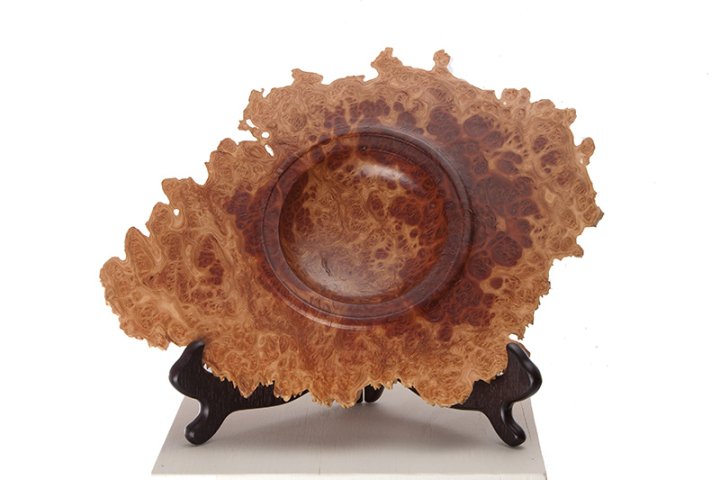
A few pieces of cherry burl waiting for more finish..... 
Knowledge You Can Build On — Est. 1998

Burl
Malcolm Ray
A few pieces of cherry burl waiting for more finish.....
Re: Burl
Jeff Willaford
Good picture Mac. You could even make it a little larger.
Re: Burl
Tony Reynolds
Looks like you had some fun!!

Re: Burl
Steve Kubien
Perfect use of a workbench!
Re: Burl
Malcolm Ray
My other bench is a tablesaw......
Re: Burl
Carole Valentine
Show off! 
What do you do, plant burl seeds in all the Maine cherry trees???? Me thinks it's about time you and Carol made a trip south!
how to handle photo sizes for posting...
GaryG in MD
Malcolm,
I love your work, but I can't see it! Here's some help that should permit you to reprocess it and resubmit it so we can see all those beauties!
Regarding digital images. There are two different kinds of "sizes".
There is the physical image size, and the size of the computer file in kilobytes (or megabytes).
To post a photo here, you want two things:
1) a photo with a physical size that is a substantial fraction of the entire screen, and
2) a file size of no more than about 80kB.
The photos that come off your camera typically have a much larger physical size and a much larger file size, and you can often pick the format. One of the most common formats is Jpeg (or .jpg). This is a good format to use. Upload your photos to your computer and put them in an ad hoc folder of your choice in your file management structure. Remember where you put them. You need to adjust both of the physical and file sizes, per the above info. The other aspect is the density in "dots per inch". For a computer display, you don't need anywhere near the density that you do for a print. 72 dpi is just fine for any monitor.
There are a great many free programs available to do these two things. Adjust the physical size first and look at the file size. If it's greater than 80kB, then do the second step. Or just do the second step as a matter of course, because it probably will be needed.
These two tasks will be easier in some programs than others. I use a more full-featured program, but Irfanview is a good choice for simple modifications and for viewing. To use Irfan, you would would first open the image in Irfanview. I have Irfan set as my default jpg viewer, so all I have to do is double click the file name to open it. Click the "image" tab at the top of the photo and from the menu select the "resize/resample" link. In the right-hand column of the resulting window, click the "Best fit to desktop" button and "OK". Back on the image, click the "file" tab at the upper left and select "save as" from the menu. In the small window to the right, click the "set file size" button and type "80" into the window. In the left-hand folder management window, change the file name to something different by adding a few characters meaningful to you to indicate that it has been sized (like "80"), and hit "save". You will now have a new file with the right physical and file sizes. You can add this photo to a WC post simply by hitting the "browse" button on the WC message window and going through your file management structure to the file where you have stored it and double click it.
Do not be concerned if you double click the new file with Irfan and find it rotated. That's some kind of error in the program. Your saved image should be correctly rotated regardless of whether your camera was in the portrait or landscape mode when you shot the image. At least that's the way it works with my Canon EOS system.
Hope this helps, Gary
WC's max file size is 100kb
Re: Burl
Randy Gleckler
Those are all very pretty... great looking set of burl bowls.


