Home Articles Forums Gallery Marketplace Videos

WoodCentral Forums

Knowledge You Can Build On — Est. 1998

This is the most versatile work station you will ever use

Phrugal Photo Diagnosis

Posts

Phrugal Photo Diagnosis

#1

Phrugal Photo Diagnosis

Dave Winters

>Symptoms: I'm using halogen work lights and bounce cards to fill in. I'm using the tungsten setting on my camera. But the image comes out of the camera looking quite dark. I do have Photoshop Elements, and I'm able to fiddle with the image that way on most shots. My background is an off white paper.

Seems like a camera setting is the problem, but...??

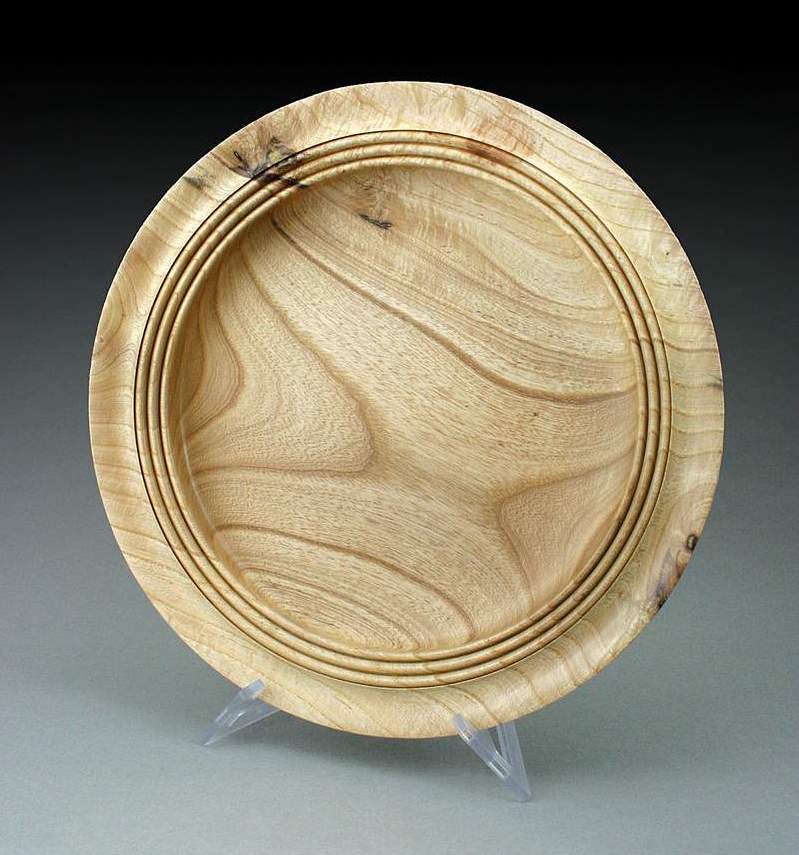
I'll post some pics tonight of my setup, and one
Re: Phrugal Photo Diagnosis

#2

Re: Phrugal Photo Diagnosis

john lucas

>The light meter is probablly doing what it is designed to do. That is to make a scene look average in brightness. Most scenes are not prodominantly white so the camera sees that as an overexposure situation and adjusts itself to average. Consequently your white background looks more gray.

To put this in photographic terms the average scene looks like 18% gray. White on the other hand is about 2 f stops or more brighter so when the camera meters that it tries to underexpose by 2 or more f stops to make the scene gray. That's why white looks gray in many photos.

To get around this you have 2 options. If your camera has manual exposure you can simply change the exposure until it looks correct. If you don't have manual exposure control see if you have over/under exposure compensation. Then adjust it so that the setting is +1 or +1.5 and you should be close.

Re: Phrugal Photo Diagnosis

#3

Re: Phrugal Photo Diagnosis

Dave Winters

>John, thanks. I'll check out my camera. Does it help to shade the light somehow so the camera doesn't "see" it so much?

I very much like the photos I've seen with a grey backdrop. Is there a good source for that that's reasonable? (read: phrugal)

Thanks again-

Dave

Re: Phrugal Photo Diagnosis

#4

Ric Taylor

Re: Phrugal Photo Diagnosis

Ric Taylor

>Like John said, it sounds like an exposure problem.

Your lights are very bright (maybe too bright), and they are shining on a white surface. It's like sunlight on snow. The camera thinks it's too bright and overexposed, so it compensates by reducing the light intake.

Ric

Re: Phrugal Photo Diagnosis

#5

Re: Phrugal Photo Diagnosis

John K Jordan

>You can buy a gray card for photo use at many photography/camera stores. If your camera has a way to set manual exposure, set your lighting as desired and just before the exposure hold the card where the subject will be and set the exposure.

If your camera does not have manual exposure but has a button to "hold" the exposure, you can sometimes press this button while aiming at the gray card but this is often cumbersome.

Without a gray card, if your camera gives you control of various metering methods a "spot" method may work better than a multipoint or averaging method if the subject is in the center of the screen. However, even that can be tricked if the subject itself is very dark or very light (ebony or holly).

JKJ

Re: Phrugal Photo Diagnosis

#6

Re: It would help to see an image of....

Jamie Donaldson

>...your set-up, but John has posted the probable solution to this very common problem. This is an example of operator needing to know how the equipment actually works, then being smarter than a dumb mechanical contraption.

Re: Phrugal Photo Diagnosis

#7

Re: Phrugal Photo Diagnosis

john lucas

>Dave You are correct in that shading the background will change the exposure but it's guess work. The gray card method is the best. An alternative method we used in nature work was to meter our palm and then open up 1 stop over that setting.

Re: Phrugal Photo Diagnosis

#8

Re: It would help to see an image of....

Dave Winters

>Thanks, guys. I'm learning. I'll take a picture tonight of my set-up, then have a look at my camera settings.

Re: Phrugal Photo Diagnosis

#9

Here's my setup

Dave Winters

>O.k.

on my camera--Pentax Optio 33WR--

As I said, I'm using the Tungsten setting for the White Balance,

-Focusing area is Spot or Multiple, I used Spot.

-Sensitivity setting; I used Auto, but there's also 50,100,200 or 400.

-Quality level; I used 3 Stars, but there's one and two also.

-Recorded Pixels; I used 2048x1536.There's also 640x480,and 1024x768.

- AE Metering, I have 2 settings, not sure what they are.

So, which if any, of these can I play with to let more light in?

BTW, the attached pic is a turning by my student, 2nd ever turning!

Thanks!


img

Re: Phrugal Photo Diagnosis

#10

Re: Here's my setup

Dave Winters

>The booth.


img

Re: Phrugal Photo Diagnosis

#11

Re: Dave- I prefer white reflective ....

Jamie Donaldson

>...panels like foamcore board for the top and sides of the enclosure. Cloth does not bounce light but rather absorbs and diffuses, and a single light source works well for the bounce light techniques. I don't know what the AE exposure settings are for your camera-see if they are a + and - setting when using AUTO exposure.

Re: Phrugal Photo Diagnosis

#12

Re: Dave- if you have seen the Phrugal.....

Jamie Donaldson

>...Photo enclosure, notice that the single light on the R side has a foamcore panel that prevents the bright light from striking the camera lens, resulting in exposure errors and flare.

Re: Phrugal Photo Diagnosis

#13

Re: Dave- I prefer white reflective ....

Dave Winters

>Jamie- Thanks. How about my other camera settings? Am I right about using the tungsten setting on white balance?

Thanks again,

Dave

Re: Phrugal Photo Diagnosis

#14

Re: Dave- Tungsten is correct for .....

Jamie Donaldson

>...color balance with those lights, and other setting seem to be right for this situation.