Home Articles Forums Gallery Marketplace Videos

WoodCentral Forums

Knowledge You Can Build On — Est. 1998

Find a woodworking club near you

photo quality

Posts

photo quality

#1

photo quality

John Lucas

>I've looked at a lot of photos on this site in the last week or so and there seems to be a common thread. There are 3 problems that show up most often and all are easy to correct.

The first one is orange looking photos. This is usually cause by having the camera set on daylight white balance when you should be using Tungsten white balance on your camera.

The second is out of focus or fuzzy photos. There are usually 2 reasons for this this. One is that the camera won't focus close enough. If your camera has a macro or close up mode switch to that setting. If not back up until the bowl is in focus and then crop it later so with your software so the bowl fills the frame. There are actually 2 other possibilities. One is a shutter speed that is to slow to hand hold and get sharp photo. Use a tripod. The 3rd possibility is simply the auto focus picked the wrong point to focus on. If you have manual focus use that, if not see if your camera has a focus lock feature and use that.

The last one is not really a problem but your photos will look a lot better. Use a plain background, not wrinkled cloth. This could be as simple as ironing the cloth or use piece of poster board. There are some beautiful pieces being photographed and a poor background takes away from quality of the piece.

This is not a critic or a rant just trying to help you present your work so it can be seen it the best light.
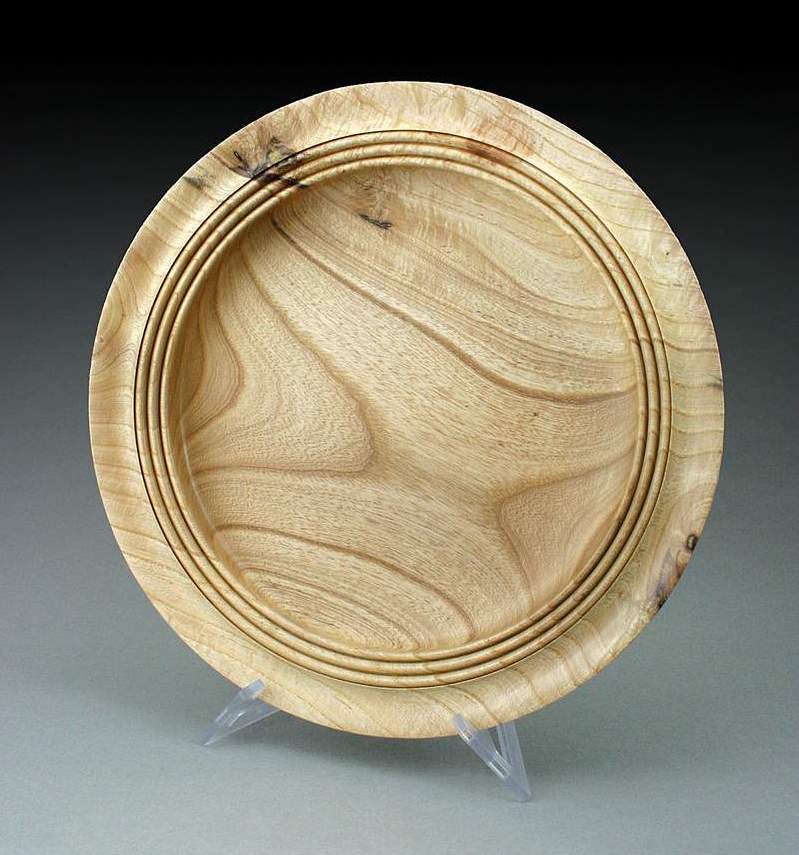
Re: photo quality

#2

Re: photo quality

Carole Valentine

>I use a fifty cent piece of poster paper from the drug store. When it gets crumby, I toss it. Easy to store upright behind the bookshelf.

My problem is depth of field. I have tried everything suggested on various forums and nothing seems to work. My manual just sort of skips over that aspect. My camera is almost a dinosaur though. :(

Re: photo quality

#3

Re: photo quality

Don Tewell

>If you have a manual camera (one where you can set the shutter speed and aperture), just remember the higher the f stop (aperture) the greater the depth of field. f22 ='s greater depth of field than, say f8.

Just my 2 f stops worth.

Re: photo quality

#4

Re: photo quality

John Lucas

>Carol If you want to e-mail me I will try to help you. many older digitals and some of the new ones are not very good when it comes to getting enough depth of field or even setting the overrides.

Re: photo quality

#5

Re: photo quality

RussFairfield

>You can trick a digital camera into getting the auto-focus to be where you want, rather than where it wants. It does require that the camera have a 1/2 stop on the shutter button that locks all of the automatic settings. Most of them do.

Place a book on end just outside of the field around the object whose picture is being taken. The background and lighting should be the same. Set the book so the canera will see the sharp edges of the covera as vertical lines separated by the white pages. Set this at the distance you want the focus, aim the camera at it. push the button half way down to fix the focus setting, swing over to the object, and click the shutter to take the photo.

Re: photo quality

#6

Re: photo quality

Carole Valentine

>My camera only goes to F8. It supposedly has a "Manual" focus in AV mode where you use the zoom lever to focus, but it is useless. The camera is a Toshiba PDR-M70. I sure that today I could proabably get a much better camera for a lot less than I originally paid for this one, but I rather have turning tools and accessories. I guess a camera is a turning accessory, though.

Re: photo quality

#7

Re: photo quality

Carole Valentine

>I think that's sort of like focusing about 1/3 the depth of the piece, holding the button, then swinging back to center before snaping the pic. Doesn't seem to help much with depth of field on my camera though.

Re: photo quality

#8

Re: photo quality

John Lucas

>One thing I've noticed is some digital cameras don't actually have physical F stops so changing the setting from say f5.6 to f 16 doesn't actually change the depth of field. It's done electronically. I have never seen this written up anywhere and is not in the specs when you look them up. I'm pretty sure it's true judging from a few of the cameras I've played with.

Re: photo quality

#9

Re: A big help is to....

JamieDonaldson

>... plug the camera image output into a TV monitor if possoble. Those little built-in viewing screens are not helpful for critical use such as shooting turnings.

Re: photo quality

#10

Re: photo quality

John Lucas

>Carol Ihave the same problem only on a higher scale. I have the Canon Digital rebel but really need the new Nikon D200. I would rather spend that money on wood tools.

I find manual focus on most of the amatuer cameras is really hard to use. Even on the $5000 nikon cameras the focus isn't as bright and easy to focus as an older $500 nikon manual focus cameras.

Re: photo quality

#11

Re: photo quality

Jorge Castaneda

>Carole,

I don't see in my digital camera any f stops, but there is a way of changing shutter speeds, so I trick my camera by choosing a relatively slow speed, say 1/60, and a very bright light, then it has to go to a small aperture.

Jorge

Re: photo quality

#12

Ric Taylor

Re: photo quality

Ric Taylor

>I have a Canon Digital Rebel also, which I love for outdoor and action photos. But for close work, like shooting turnings, I have found that my old Nikon Coolpix 4300 shoots crisper photos with finer detail.

Ric

Re: photo quality

#13

Re: photo quality

John Lucas

>The nikon shouldn't be any crisper unless the lens you have for the canon doesn't do a good job up close. I've been using a Nikon +1.5 diopter on my canon with the 55 to 200 zoom. It does a good job of photographing small things.

Re: photo quality

#14

Re: photo quality

John Lucas

>Jorge That's exactly what I'm talking about on some of the cameras when you change the shutter speed you do get a correct exposure but it doesn't actually change the f stop. It only changes the exposure electronically. Photograph a yardstick while focusing on the 1 foot mark. Use a tripod. Then change the shutter speed. The depth of field should change but on some cameras when I do this test the depth of field doesn't change.