WoodCentral Forums

Est. 1998 — 27 years of woodworking knowledge

I've asked this before but.....photos

Posts

I've asked this before but.....photos

#1

I've asked this before but.....photos

ken ca

How does one upload and display MORE than 1 photo per post?

Unfortunately, the site "search" function doesn't work and a (Google) search from the main page didn't help.

The woodcentral FAQ says this:

Place your cursor in the message text box where you want the image to appear in your post, then click the "Browse" button next to the "Upload embedded image" box and browse to the image or file on your computer and click Open. In a few moments, a line of code will appear in the message text, surrounded by [uplimg][/uplimg] tags. You may uplpoad as many images as you like, wherever you like, in the message body, as long as no image or file exceeds the file size limit for that type.

but there doesn't appear to be a browse or upload image box. Heellllppppp....

Re: I've asked this before but.....photos

#2

Rafael from PA

Re: I've asked this before but.....photos

Rafael from PA

Ken, you need to be logged in.

The method is convoluted, but if you are, then the posting screen shows an upload file button.

Re: I've asked this before but.....photos

#4

Re: I've asked this before but.....photos

ken ca

I assumed when it says "welcome back ken_ca" that I am logged in?

and I don't see a "log in" request anywhere, or log out for that matter!

Re: I've asked this before but.....photos

#5

Re: I've asked this before but.....photos

ken ca

Derek,

I have postimage too, but don't see how it can combine photos into one multiple photo image?

Re: I've asked this before but.....photos

#6

Rafael from PA

Re: I've asked this before but.....photos

Rafael from PA

Sent you an email. Easier to explain there.

Re: I've asked this before but.....photos

#7

Ellis Walentine

Here's the drill...

Ellis Walentine

Ken, thank you for being persistent. I know this forum software can be daunting until you understand it.

First, you need to have a registered profile in order to post directly from your computer to the forum. I can't find one for you, and I suspect you don't have one because your name shows up as plain black text. If you were using a registered username, it would be blue and hyperlinked. So, create a profile, and then make sure you use the exact username and email address as your profile when you post. You will then see the upload button and all the other posting options in the message posting interface. We've recently updated our file size limit to 1Mb per image. You'll have to reduce your camera images to under that limit or else they won't be accepted.

Let me know if you hit any snags.

Ellis Walentine, Host

WoodCentral.com

Re: I've asked this before but.....photos

#8

Re: I've asked this before but.....photos

Derek Cohen (in Perth, Australia)

Derek,

I have postimage too, but don't see how it can combine photos into one multiple photo image?

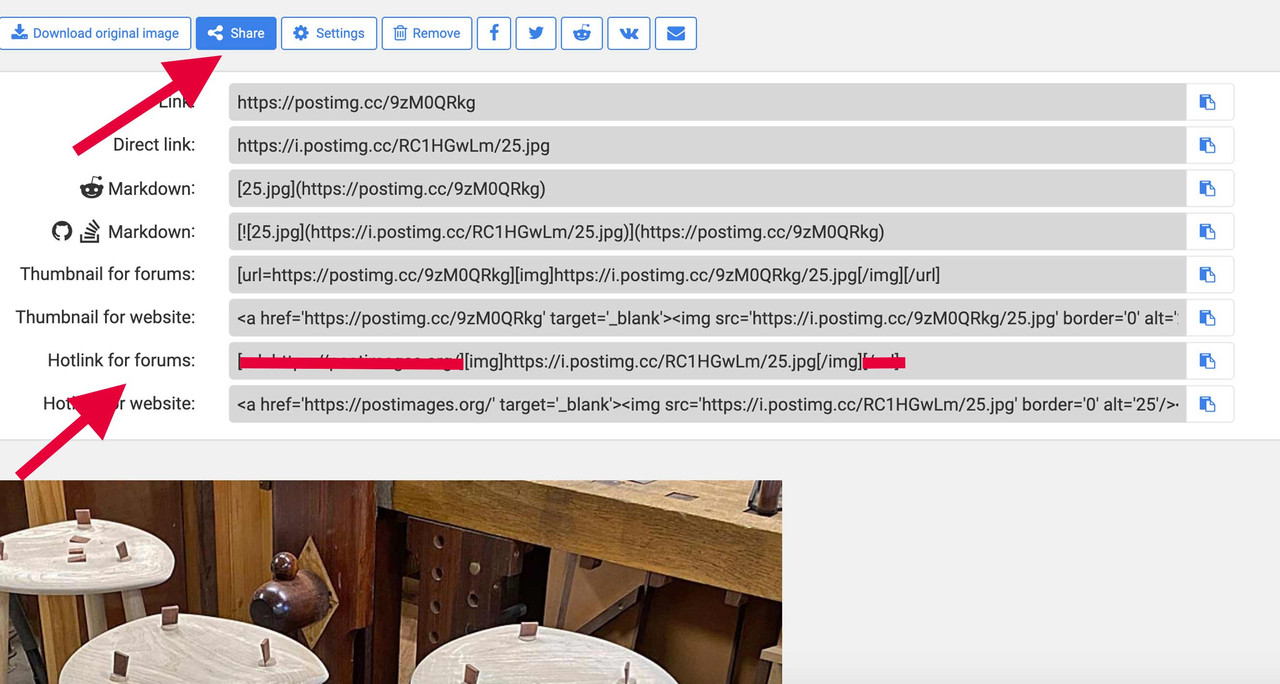
Ken, all you do is copy and paste. Here is a screen shot from Postimage ..


The red arrows show where to go, and the red line shows what to delete.

Simply copy and paste as many lines of code as you want (each line is a photo)

Regards from Perth

Derek

Re: I've asked this before but.....photos

#9

That was easy, thanks Ellis  N/M

ken ca

Huh, that was easy, thanks Ellis!

Re: I've asked this before but.....photos

#10

Thanks Derek N/M


👍 This page answered my questions

Your vote helps other woodworkers quickly find the answers and techniques that actually work in the shop.