WoodCentral Forums

Est. 1998 — 27 years of woodworking knowledge

"Building" a Stanley #5 (virtually)

Posts

"Building" a Stanley #5 (virtually)

#1

"Building" a Stanley #5 (virtually)

Dominic Greco in Richboro PA

>A couple of weeks ago I asked a question concerning CAD drawings of hand tools. The reason I wanted CAD drawings was so I could lay out the design for my tool cabinet while I was at work (during lunch of course). The responses I got were not encouraging. And my subsequent searches on the internet did not yield any better results.

I've been working with AutoCad for 20 years, and Solid Modeling for about 5. I'm pretty good at both (after all that time, I'd better be!). So I decided that if I wanted quality drawings, I'd have to make them MYSELF.

The problem is, I tend to go a bit over board with things like these. I once wanted an elevation view of the Enterprise (NCC1701D) for my office at work. That project morphed into a highly detailed CAD drawing that took me almost 2 weeks (at night) to complete! This case is no better. So far I have the body, knob, and attaching hardware for a Stanley #5 drawn in 3D. All the measurements were taken via scales ("rulers" for you non-engineer types), calipers or micrometer. The body is very detailed and features the tapped holes, lofts and draft angles you'd find on the real casting. Once I get all the pieces completed and "assembled", I can generate CAD drawings of any view in seconds.

Now you're going to ask, "Why go through all the trouble of drawing this in 3D?" My reply, "Why not?" No one else seems to be doing this. And some of the parts I make for the #5 can be used (with a bit of modification) when I draw up my #8, #6, #4 and #3 Stanley Planes. (ambitious, eh?) :>)

And besides, using the supplied Rendering program, I can get very realistic images from my 3D models. (see attached)

Now I ask you, does this put me in the same category as that guy who wrote the first couple paragraphs of "Moby Dick" on a grain of rice?

See ya around,

My ugly mug


Dominic


img

Re: "Building" a Stanley #5 (virtually)

#2

Re: "Building" a Stanley #5 (virtually)

Ernie miller Topeka ks

>Are you nuts? all thgis time you spend drawing you could be in the shop! looks good eral good. You are right alot of the parts are interchangable. Are all of your planes the same type# I can see you gettong upset when you find out one of your frogs are differant and will have to go back start from scratch. are you going to mae thease availabel to others?

Re: "Building" a Stanley #5 (virtually)

#3

Re: "Building" a Stanley #5 (virtually)

Dominic Greco in Richboro PA

>Ernie,

It's just too damn cold out there! It was 23 deg F today. But that is positively balmy compared to yesterday. I think we broke a record.

In the virtual world, it's easier than hell to copy a part, change a couple dimensions, and end up with the one you want. Momma Greco didn't raise no fool! :>)

As far as making them available, let me finish this first one. Then we'll see how it goes from there.

See ya around,

Dominic

Re: "Building" a Stanley #5 (virtually)

#4

More! More!

Jerry Nicholson

>Show us more!

Jerry

Re: "Building" a Stanley #5 (virtually)

#5

Re: "Building" a Stanley #5 (virtually)

paul womack

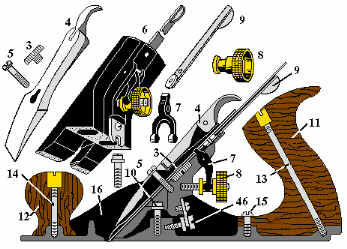
>This would be an excellent (80% or more of the work) start point for doing a really good version of this:

bailey parts diagram

that would be very useful when talking about plane use or tuning with newcomers to woodwork (or handplanes)

BugBear

Re: "Building" a Stanley #5 (virtually)

#6

Exploding is easy!

Dominic Greco

>Paul,

That's another reason why I decided to do this. I can make an exploded view with a touch (or two) of a button. In the past here at work these exploded view drawings were used in manuals.

Once I get the entire assembly completed, my goal is a 3 view drawings, a realistic rendering, and an exploded view.

Dominic

Re: "Building" a Stanley #5 (virtually)

#7

Re: "Building" a Stanley #5 (virtually)

Ernie Miller

>This is driving me nuts. I am used to sketchup and grabbing hold of somthing and spinning it around for differant views. Can we give you a list of planes that we really want done. We will also need chisels, saw, squairs and etc, etc, etc

Re: "Building" a Stanley #5 (virtually)

#8

Re: SUPERB!

paul womack

>

Re: "Building" a Stanley #5 (virtually)

#9

Re: "Building" a Stanley #5 (virtually)

stephen slyke

>Just so the traditionalists are not left out, here is the start of a molding plane done sketch-up. It is shown in 'X-ray' view.

-Stephen


img

Re: "Building" a Stanley #5 (virtually)

#10

Re: "Building" a Stanley #5 (virtually)

Eric Kuehne

>You know, Dominic, if you're using something parametric like Solidworks, Inventory or Pro-E you could just make different configurations of the parts and assemblies and create the entire line of bench planes in one model. OK, may not all of them, but most of them for sure.

FWIW, as a true geek, I really like the idea of creating a database of CAD models for they tools we use. Maybe Ellis could host it. Of course, we would have to standardize data formats. We could even include the power tool side. Or maybe I'm getting carried away. You think?

Eric, high up in Los Gatos, who frequently gets carried away

Re: "Building" a Stanley #5 (virtually)

#11

Very cool Dominic...

Scott Burr in Ben Lomond CA

>Are you using Inventor? Wadda you do for a living that you use solid modeling? If I may ask...

I've been using ProE for about 15 years now. I tend to go a little overboard when it comes to creating solid models myself.

Scott, currently doing a wacky assembly fixture...


img

Re: "Building" a Stanley #5 (virtually)

#12

Re: "Building" a Stanley #5 (virtually)

Donald Pierson

>Beautiful work. It is amazing to see how far Autocad and PC computing power has progressed. Ten years ago I watched a Boeing engineer use CATIA (their CAD at the time) on their high-powered computers and it blew me away!

Re: "Building" a Stanley #5 (virtually)

#13

Virtual Infill

Sandor in middletown, DE

>My contribution:


img

Re: "Building" a Stanley #5 (virtually)

#14

What was that?

Paul M. in San Diego

>That looks like an extremely tall toilet (for Giraffes?) with plumbing going down into the foundation and out into a septic tank. Please tell me I'm wrong.

Re: "Building" a Stanley #5 (virtually)

#15

Re: "Building" a Stanley #5 (virtually)

Dominic Greco in Richboro PA

>Erik,

You wrote:

"You know, Dominic, if you're using something parametric like Solidworks, Inventory or Pro-E you could just make different configurations of the parts and assemblies and create the entire line of bench planes in one model. OK, may not all of them, but most of them for sure."

That was my goal all along. It's also the reason I went into so much detail on the casting. Many of the features are based on proportions and variables sequestered about the model.

See ya around,

Dominic

Re: "Building" a Stanley #5 (virtually)

#16

Hi Scott

Dominic Greco in Richboro PA

>Scott,

You wrote:

"Are you using Inventor? Wadda you do for a living that you use solid modeling? If I may ask...I've been using ProE for about 15 years now"

I'm a mechanical engineer working in the Aerospace industry. To be brutally honest I use Inventor only to be able to convert models created in that program to STEP format. Personally I'm not real fond of it. It crashes WAY too often for my tastes. I prefer Solid Edge, Solid Works, or ProE.

See ya around,

Dominic

Re: "Building" a Stanley #5 (virtually)

#17

Re: "Building" a Stanley #5 (virtually)

Ernie Miller

>That looks more like a rebate plane that a molding plane. or as some people call them a bodger plane

Re: "Building" a Stanley #5 (virtually)

#18

Re: "Building" a Stanley #5 (virtually)

Ernie Miller

>is that one to scale? if so it wouldn't take much to creat a set of H&R's from it. and then on to side beades. Queation about sketch up when doing a room do you make all of the contents as a seperate file and them place them in the room?

Re: "Building" a Stanley #5 (virtually)

#19

Your wrong Paul...

Scott Burr in Ben Lomond CA

>Ya see, the green part is part of an Express Card. That's an air cylinder on the top that triggers a guillotine blade (gold) that snips off a support rib that needed when the part is injected molded.

The transparent blue piece guides the blade and keeps those little fingers away from the process. The support rib will fall out the bottom on the fixture in a bin. Then that little rib gets reground and recycled into more plastic.

Now the big question do I make the blade out of O1 or A2 steel...

Re: "Building" a Stanley #5 (virtually)

#21

Sketchup help

Pam Niedermayer - Austin, TX

>You may want to check out the Design forum at Sawmill Creek, there are a couple or three Sketchup experts hanging about.

Pam

Re: "Building" a Stanley #5 (virtually)

#22

Re: "Building" a Stanley #5 (virtually)

Wendell @ Murphy, TX

>My philosophy is to build the pieces in separate files and add them to a room layout. I find that I want to draw the pieces using woodworking units (inches & fractions) but layout a room using architectural units (feet & inches). Also, if the piece is something that I am planning to build, I do a fairly detailed model to help work out all the joinery. I wish I could cut real joinery as easily as I can in Sketchup :)

There is a really good Sketchup tutorial on the UK Workshop forums. It helped me figure out how to draw things more accurately and faster at the same time.

Wendell

Re: "Building" a Stanley #5 (virtually)

#23

Re: "Building" a Stanley #5 (virtually)

paul womack

>That looks more like a rebate plane that a molding plane. or as some people call them a bodger plane

Are you thinking of a "Badger Plane", which is skew mouthed jack plane open at one edge, used for "extra manly" size rebates?

BugBear

👍 This page answered my questions

Your vote helps other woodworkers quickly find the answers and techniques that actually work in the shop.