WoodCentral Forums

Est. 1998 — 27 years of woodworking knowledge

OT - Problem using Microsoft Word

Posts

OT - Problem using Microsoft Word

#1

OT - Problem using Microsoft Word

Ralph Lipeles

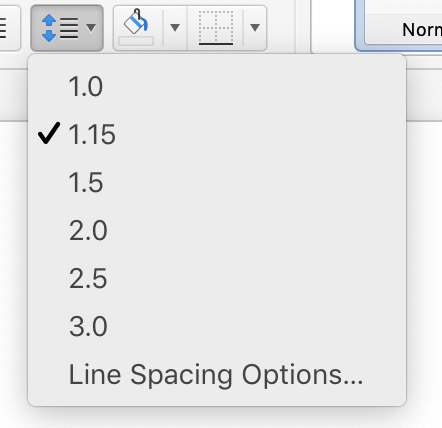
My microsoft word program has always come up with zero spaces between lines. Somehow it now has 1 line between lines. I found a menu for making changes but my choices are: 1, 2 or 3 line spaces between lines. It does not give me an option of zero but that is what I always had. Anyone know how I can get back to zero?

Re: OT - Problem using Microsoft Word

#2

Re: OT - Problem using Microsoft Word

Chuck in Mtl.

which version of MS word are you using?

Re: OT - Problem using Microsoft Word

#4

No Spacing Button

Steve Elliott

My older version of Word has a button for "no spacing" at the top. I use it a lot.

Re: OT - Problem using Microsoft Word

#5

Re: No Spacing Button

John K Jordan

An even older version of MS word that I use has various spacing options under Character and Paragraph formatting.

As with all computer and software related questions, if you always provide the platform (computer, OS) and the version of the software you are using you might get directly useful instructions.

JKJ

Re: OT - Problem using Microsoft Word

#6

Re: OT - Problem using Microsoft Word

Yonak

In my version of Word, I don't see the formatting options the previous posters mention. When I notice too much space between lines I employ : shift-return to get the lines closer together.

Microsoft Word Help tells how to do it but it doesn't tell how to get to the place where the change must be made. Help tells me to adjust the point size in the Pitch Box under Lines. I have no idea where either of these things are.

If anyone could tell me how to do it I would be grateful. I have Word 2002.

Re: OT - Problem using Microsoft Word

#7

Jim DeLaney, Austintown, Ohio

Re: OT - Problem using Microsoft Word

Jim DeLaney, Austintown, Ohio

Your choice of '1' is single spacing. A zero would (theoretically) over-write the line.

What is it you're trying to do?

I'm using Office 365 (the newest) and it offers 1, 1.15, 1.5, 2, 3, etc. Plus there is a customization option.

Go to 'Home'-'Paragraph'-'Line and Paragraph Spacing' to make your selection (assuming you're using a recent version).

Re: OT - Problem using Microsoft Word

#8

Re: OT - Problem using Microsoft Word

Ralph Lipeles

That's what I have but I do not want the minimum of 1 space. I want zero spaces. I used to have that but something has changed.

Re: OT - Problem using Microsoft Word

#10

Re: OT - Problem using Microsoft Word

Ralph Lipeles

I fixed the problem. I had to cheat a little to do it. I took a file that I had done a few years ago, with the spacing that I wanted, erased it and redid it with what I wanted. It came out fine.

Re: OT - Problem using Microsoft Word

#11

Re: OT - Problem using Microsoft Word

John McGaw

Yeah, none of that made sense to me and I've used many different word processing programs going way back to one I wrote myself in the 70s. It would seem that "zero" spacing would mean that each line would be printed over the line before. A way to save paper but not much good for reading. I'm hoping that the OP means single-spaced as it was in typewriter days.

Re: OT - Problem using Microsoft Word

#12

Word 2000

David Yoho

I use an old version of Word (2000). At the top of a document under Format there is Paragraph. Click it and a box appears with a tab for Indedents and Spacing. About midway under Spacing there is a setting for Line Spacing. There is a choice of Single just above 1.5. I think this is what the OP is wanting. I have no idea where to look in newer versions or if it even has the same vocabulary.

Re: OT - Problem using Microsoft Word

#13

Jim DeLaney, Austintown, Ohio

Re: OT - Problem using Microsoft Word

Jim DeLaney, Austintown, Ohio

Now all you need to do is save that old blank document as your (new) template, and everything you use it for will have your desired spacing.

Re: OT - Problem using Microsoft Word

#14

Re: OT - Problem using Microsoft Word

Ralph Lipeles

By zero spacing I mean a space that is about 1/32" as opposed to single spacing that is agout 5/16 inch with my word procesor.

👍 This page answered my questions

Your vote helps other woodworkers quickly find the answers and techniques that actually work in the shop.