Posting pics
Steve jenkins
Is it possible to post pics that only reside on my phone?
Est. 1998 — 28 years of woodworking knowledge
Posting pics
Steve jenkins
Is it possible to post pics that only reside on my phone?
Re: Posting pics
Steve jenkins
Ok I read the section in the FAQ on posting pics so my question now is on my IPhone how do I tell the size of the pic and can I resize it
Re: Posting pics
John K Jordan
I don't use an iPhone but with any photo on any device you can load it into a photo editing program and reduce the size (and PROBABLY the amount of JPG compression) and resave a copy of the image before posting. I use Photoshop or Photoshop Elements on a Win10 PC for this - extremely simple and fast.
Alternatively, use an on-line program. Ellis recommended this:
http://www.woodcentral.com/woodworking/photography/index.pl/page/6/md/read/id/456069/sbj/picresize-experiment/
Alternatively, you can put the photo on a web site somewhere and include a link to it but that can cause several problems. Best to resize and upload.
BTW, every time I resize a photo for posting I keep the copy in some "for posting" directories in case I want to use them again. At the moment I have over 2300 photos in that directory tree.
JKJ
Re: Posting pics
Bill Houghton, Sebastopol, CA
On my computer, I can right-click on a photo and choose "Get Info," which will tell me how big it is. Although I don't have an iPhone/smartyphone, I imagine there's a similar menu choice somewhere. Maybe the Google can tell you how.

Re: Posting pics
Jack Guzman from Maine
I plug my I-phone into my pc with the usb plug that came with the phone. I open the phone pics file in my files folder choose the photo and edit it for size. You need to get it down to less than 100kb. Phone photos are too big for woodcentral.
There are meme apps and resizers..
David Weaver
two different things.
1) I like the meme apps because they allow you to post full size images and they don't charge or care how much bandwidth you're using (as opposed to the older free image and album serving websites that want to collect a fee).
They don't know that you're not posting memes or social media focused pictures, so no big deal.
I like to use IMGUR.
2) There are also resizing apps for your phone that will attempt to resize to a certain size that would be within the limits of this site. The only trouble with that is that the site limitation is small and thus the resulting images are also small.
Personally, I'd rather keep the images full size, have them all in one place, and not put the burden of serving bandwidth on this site, so I chose the first.
It meets your criteria - the app makes uploading images very easy, and you may actually get meaningful response in the comments to your uploads once in a while (you can upload private images and serve them, too).
https://i.imgur.com/D7pob88.jpg

(when you click through, you'll see that you can get to a very large version of this image - in this case, I was trying to illustrate a french polished test piece where the shellac was applied directly to wet stain in one session with no follow-up work, and I used the wet oil based stain further as the oil to rub more and more finish on. If the image gets too small to get down to 100kb, it can be hard to see what you want to see).
Taking, tuning and posting pics
Derek Cohen (in Perth, Australia)
Steve, I have used an iPhone 6 over the past 12-18 months in place of a Canon DSLR camera to take photos of builds in my workshop. It does an amazing job. Still, the camera alone is not enough. The most obvious factor is perspective. Thereafter one may need to crop and resize.
When I am at home, I copy photos from the iPhone to my MacBook Pro with an app called Mac FonTrans. It is also useful for adding/removing music and videos without the need for iTunes. Then the ipg file can be loaded to PhotoShop Element (I have version 12), where it can be manipulated as needed (contrast, croping, resizing, etc). Finally, I upload the image to a website Postimage.com, from where I can link to any website now or in the future.
I am overseas at present and carry my iPhone 6 and a small MacBook Air. The hard drive is too small to keep all the apps, and so I use a different method. First I open the image in Preview. Then I crop the unneeded area (>Tools>Crop). If I want to manipulate the image, go Tools>Adjust Color, and finally re-size (Tools>Adjust Size). My default is a size of 23-24cm for the height. Done. Now I upload the images to Postimage.
This was taken in poorish light (inside a museum) with the iPhone 6 and then processed on the MackBook Air (Preview) ...
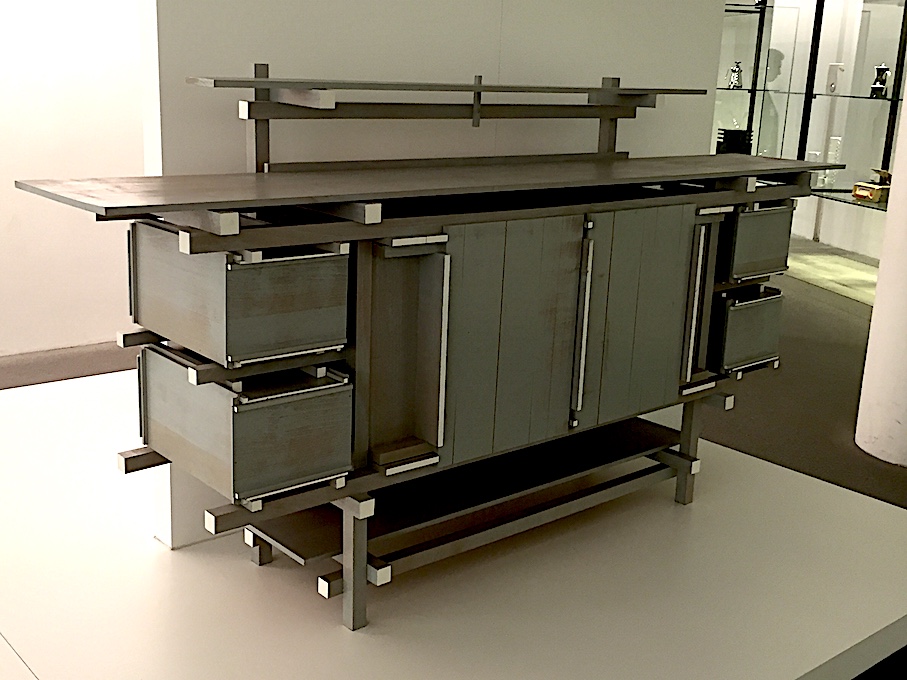
Now here is the same photo uploaded to Postimage directly from the iPhone - togther with an automatic re-sizing to 320x240 - to Postimage , and then linked here:
I would experiment with larger upload sizings, such as 640 x 480
Hope this helps.
Regards from Munich
Derek
Re: Posting pics
Steve jenkins
Thanks for all the help.
Re: Posting pics
George Koch
Steve, you probably still won't be able to post pics unless you do so under the name you registered in the profiles.
Re: Posting pics
Jim Dillon
Steve, for the purpose of this discussion, don't confuse on-screen size of the displayed image with size of the compressed file associated with that image.
The first step in preparing an image for posting is to resize it. That is, resizing your original camera image down to something that will display on a "normal" computer monitor so that it will appear "reasonable" in size. For example, if I am using a monitor set to 1240 pixels wide, then your resizing an image to, say, 620 pixels wide (long edge) will occupy roughly 50 percent of my screen.
So far, so good. But now you need to compress the image file associated with that image in order to comply with WoodCentral's requirements of 100K. Thus, as a second step, you need to compress the file to 100K. Frankly, despite your stated concerns, a 100K file can look great (IMHO) on WC.
There are many programs on the internet that will accomplish the resizing step. but you want to find a program that will do BOTH in a single operation. Ellis has provided assistance in this. Hope this helps. Jim
Re: Taking, tuning and posting pics
Jim Dillon
Derek, I have been amazed at the depth-of-field of your recent (and past) posts. Now that I know what you have been using, and I am blown away. Maybe I should just sell all my DSLRs and buy an iPhone? Continue to enjoy your posts, from wherever! Jim
Re: Taking, tuning and posting pics
Derek Cohen (in Perth, Australia)
Jim, it makes more sense to me (at this time) to update my iPhone than my Canon. This is my plan. The new iPhone 11 has a much better camera. Can you imagine?!
What struck, when I began using the iPhone, was not only the amazing depth of field, but also the low light clarity and low level of grain. I was also (and remain) blown away.
Regards from Munich (off the Singapore)
Derek
phone cameras
John K Jordan
>>>What struck, when I began using the iPhone, was not only the amazing depth of field, but also the low light clarity and low level of grain. I was also (and remain) blown away.
As a long-time photographer, the quality of photos from the phone cameras astounds me. In '14 I even had a magazine cover published from a phone photo.
For even more fun, disassemble a junk phone and note the size of the camera including the multi-element lens. Incredible.
I rarely carry my Canon 70D anymore, using it mostly indoors for things like woodturnings or an occasional wedding or church event. The primary phone camera weakness these days is the lack of quick manual control.
JKJ
Re: Taking, tuning and posting pics
Jim Dillon
Derek, LOL! For months, I've thought you were maybe using a tripod, small aperture etc. to get those close-up pics with great depth-of-field. I even considered you were focus-stacking. All these didn't make sense to me as they are time-consuming and interrupting to ones wood working work flow etc. WOW, have phone cameras made great strides. I recently pixel-peeped a low-light phone image for color and luminescence noise and was astounded at the clean image. Anyway, have a safe journey home!! Jim
Re: Taking, tuning and posting pics
Derek Cohen (in Perth, Australia)
Thanks Jim
Last leg before home in two days. It has been a busy, interesting and memorable trip. Now officially exhausted and re-climatising in Singapore (for heat after the cold of Europe) ... also to break what otherwise would have been a 17 hour flight. Only 5 hours to Perth.
Just back from drinking Singapore Slings at the famous Raffles Bar. I preferred the German beer
Some woodworking content: Visited the Singapore Botanical Gardens today. There was an interesting carving of swans in the middle of a lake. Taken with the iPhone 6 ...

... which I could swear was carved from a single piece!

Regards from Singapore
Derek


